
This guide explains how to use the provisioning script for generating all the Kubernetes components needed to run MetaDefender Core in you already created K8S cluster that depending on some configuration options chosen it will adapt the helm chart values for configuring it properly.
Also includes the details needed to understand how to install MetaDefender Core using directly the Helm chart.
Install using the Helm chart
The MD Core k8s deployment can be performed directly using the provided helm chart in our public GitHub repo here and example configuration files for different environments are provided in the helm_charts directory.
Using the helm repository
The GitHub repository can be used directly as a helm repo:
Or the repository can be cloned locally:
Exposing MetaDefender Core Service
By default, the helm chart deploys a ClusterIP service for MD Core and this can be changed to any service type supported by the Kubernetes cluster. For example, a LoadBalancerservice type can be created by overwriting the service_type value in the md-core component:
MD Core can also be exposed using an ingress:
Scaling MD Core
Multiple MD Core pods can be deployed by setting the replicasvalue in themd-core component:
TLS Configuration
In case we want to use a self-signed certificate, we need to create the secrets with the crt and key
We can set up the configuration parameters in the values.yaml file
Ingress Configuration By CSP
In case we want to use a self-signed certificate, we need to create the tls secret with the crt and key
Set up the following configuration parameters in the values.yaml file
Install MetaDefender Core using Helm
Install Nginx Ingress Controller
For Azure see example below
For AWS you need to install AWS LB Controller and set up the ingress with the annotations indicated
GCP install it automatically, see below configuration needed
Proxy Configuration
To enable Proxy, the following criteria must be met
The proxy server should be already deployed and reachable from the MetaDefender Core pod.
Add env vars needed
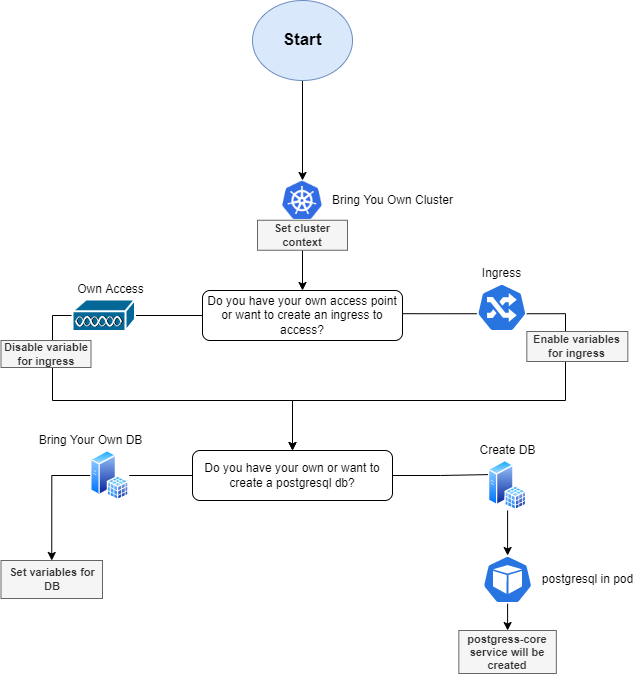
Flowchart for MetaDefender K8S Script
The following flow chart represents how the MetaDefenderK8S script will configure the environment based on the options selected for installing MetaDefender products in an already created cluster.
Summary options to be selected
Select your cluster context where you want to install the MetaDefender products
Access to the K8S cluster. Generate Ingress or provide own access.
An Ingress will be create per each product flag added as parameter to the script
Own Access, you decide how to access to the cluster so it won't generate any ingress for accessing
Have your own database or create new database
Own database, will be asked if you want either
the script to set up the credentials and database host url for you
the script will just indicate the secrets to edit, later on by you, for connecting the MetaDefender Core with your database.
Create new DB in K8S. It will generate a postgreSQL pod inside the cluster
How to run script
Script Parameters
Parameter | Flags | Options | Default | Description | Required/Optional |
|---|---|---|---|---|---|
Cluster Name | --name | md-k8s | Name of the cluster that will be used for naming all the resources | Required | |
MetaDefender Flag Installation | Combination of
| Install MD Core in the cluster provisioned | Required | ||
Image Version | --image | latest 5.0.1 | latest | MD Core image version to install | Optional |
Region | --region | [AWS Regions](AWS Regions) | eu-central-1 | AWS region where all the resources will be provisioned | Optional |
Number of Replicas | --replicas | [0-9]* | 1 | Number of replicas for MD Core service | Optional |
Namespace | --namespace | [A-Za-z]{1,10} | Namespace where MetaDefender products will be installed in the K8S Cluster | Optional Max Characters: 10 |