
MetaDefender Core has not limited the number of GET requests it serves per second thus far. Consequently, requests fetching results by data_id or batch_id can easily drain MetaDefender Core resources and directly impact the performance of scanning and processing files. OWASP considers the lack of rate limiting a type of vulnerability.
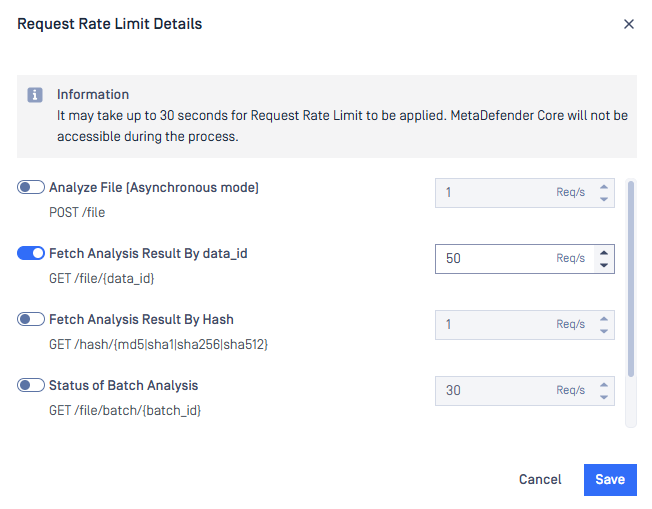
Since MetaDefender Core 5.13.0, request rate limiting is officially supported. Users can follow the steps here to set the request limits for APIs they concern.
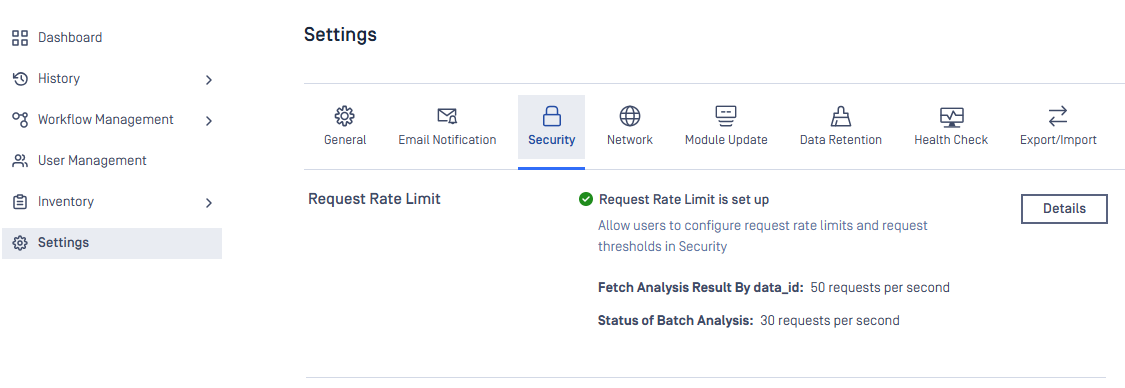
To investigate the impact of the rate limit on system performance, the same dataset is tested against MetaDefender Core 5.13.0 on the same environment for several scenarios.
Environment
Hardware | 8vCPU, 24GB RAM, 150GB SSD |
Operating system | Windows Server 2022 |
MetaDefender Core
Version | 5.13.0 |
Max scan queue | 4000 |
Engines | File type, Archive, AhnLab, Avira, Bitdefender, ESET, K7, Quick Heal, and Vir.IT Explorer |
Data set
Total file | 800 |
Total size | 762 MB |
File size | 952 KB on average a minimum of 50KB a maximum of 27MB |
File type | DOCX, XLSX, PPTX, XLTX |
Scenarios
Case | Scenario |
|---|---|
No-limit | No limit on fetching scan result |
Rate-50 | Only accept 50 fetching requests per second |
Rate-20 | Only accept 20 fetching requests per second |
Rate-10 | Only accept 10 fetching requests per second |
Rate-1 | Only accept 1 single fetching request per second |
Webhook | Apply webhook for fetching result, no limit set |
The Webhook case includes header callbackurl in each submission request to MetaDefender Core. MetaDefender Core will respond with the full scan result to the server hosted at the location pointed to by callbackurl once the scan is complete, so no fetching mechanism is needed in this scenario.
Reference here for more details about header callbackurl.
Test steps
Install MetaDefender Core and its engines on a clean environment.
Setup max scan queue and settings according to test scenario.
Submit turns of 1 second apart separately to MetaDefender Core until 2000 files are submitted. Each turn includes 10 files submitted asynchronously to MetaDefender Core using API
POST /file.For every 5 seconds, fetch results for all responded data_id asynchronously using
GET /file/{data_id}until the scan completes or 503 code responded (except the webhook scenario).
Performance per scenario
Case | Duration (min) | Number of processed files per hour | Amount of fetching requests per second | Fetching error rate (%) |
|---|---|---|---|---|
No-limit | 45.2 | 173,895 | 51.002 | 0 |
Rate-50 | 41.2 | 190,822 | 35.897 | 10.503 |
Rate-20 | 31.2 | 251,536 | 11.038 | 93.157 |
Rate-10 | 28.6 | 274,913 | 6.141 | 96.763 |
Rate-1 | 27.7 | 283,113 | 0.799 | 99.84 |
Webhook | 26.9 | 292,389 |
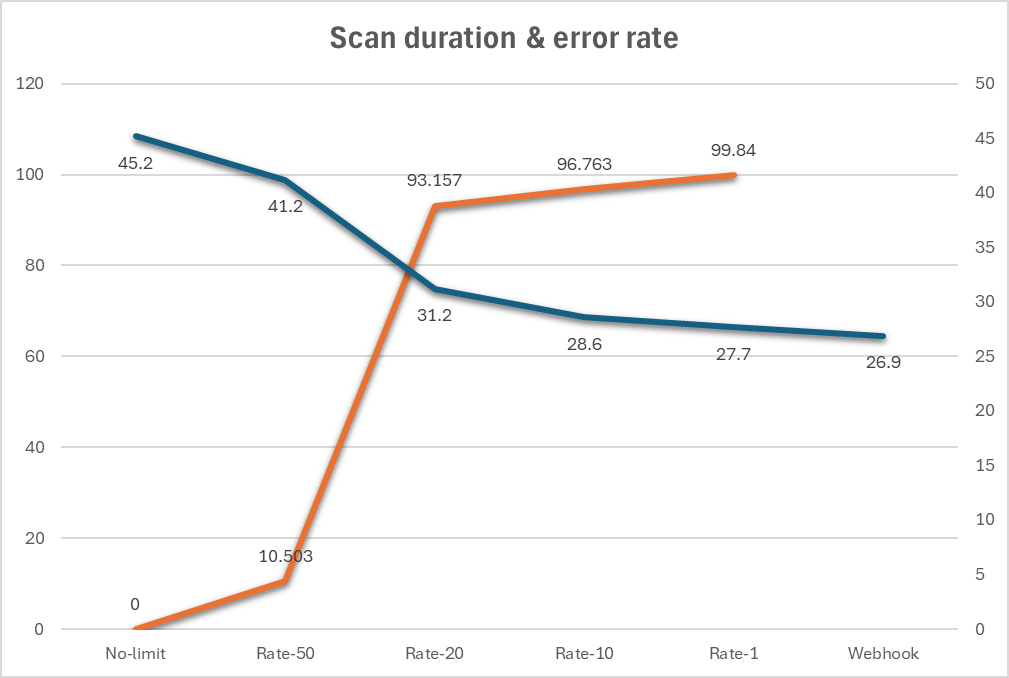
The higher the request rate limit, the better performance of MetaDefender Core. However, it causes fetching scan result to hit HTTP code 503 more frequently. MetaDefender Core archieves the best performance if callbackurl header is used.
Recommendations
Users should set appropriate rate limits for APIs of interest in order to balance the performance and fetching result frequencies.
Callback mechanism is recommended for users whom system performance is the top priority. Certainly, they need another server to listen for results responded from MetaDefender Core.