Deep CDR
v5.12.1
Search this version
Deep CDR
Deep CDR
Title
Message
Create new category
What is the title of your new category?
Edit page index title
What is the title of the page index?
Edit category
What is the new title of your category?
Edit link
What is the new title and URL of your link?
Deep CDR Details
Copy Markdown
Open in ChatGPT
Open in Claude
Together with an error message, Deep CDR module also returns forensic info to describe what happened during the process in the case file was successfully sanitized.
Sample forensic info
..."post_processing": { "actions_failed": "", "actions_ran": "Sanitized", "converted_destination": "", "converted_to": "", "copy_move_destination": "", "sanitization_details": { "description": "Sanitized successfully.", "details": [ { "action": "sanitized", "object_name": "XML content" }, { "action": "removed", "count": 1, "object_details": [ "<ddeLink xmlns:r=\"http://schemas.openxmlformats.org/officeDocument/2006/relationships\" ddeService=\"calc\" ddeTopic=\"topic\" xmlns=\"http://schemas.openxmlformats.org/spreadsheetml/2006/main\">\r\n <ddeItems>\r\n <ddeItem name=\"_xlbgnm.A3\" advise=\"1\" />\r\n <ddeItem name=\"StdDocumentName\" ole=\"1\" advise=\"1\" />\r\n </ddeItems>\r\n</ddeLink>" ], "object_name": "DDE" }, { "action": "removed", "count": 2, "object_details": [ "http://metadefender.com/", "http://google.com/" ], "object_name": "hyperlink" }, { "object_name":"XLS file", "file_name":"Microsoft_Excel_97-2003_Worksheet.xls", "description":"Sanitized successfully.", "details":[ { "action":"removed", "count": 1, "object_details": [ "Attribute VB_Name = \"Sheet1\"\r\nAttribute VB_Base = \"0{00020820-0000-0000-C000-000000000046}\"\r\nAttribute VB_GlobalNameSpace = False\r\nAttribute VB_Creatable = False\r\nAttribute VB_PredeclaredId = True\r\nAttribute VB_Exposed = True\r\nAttribute VB_TemplateDerived = False\r\nAttribute VB_Customizable = True\r\n" ], "object_name":"macro" } ], "action":"sanitized" }, { "object_name":"XLSX file", "file_name":"Microsoft_Excel_Worksheet.xlsx", "description":"invalid file structure.", "details":"Relationship file sharedStrings.xml does not exist", "action":"removed" }, { "action": "removed", "binary_object_details": ["TVqQAAMAAAAEAAAA//8AALgAAAAAAAAAQAAAAAAAAAAAAAAAAAAAAAAAAAAAAAAAAAAAAAAAAAAAAAAA+AAAAA4fug4AtAnNIbgBTM0hVGhp..." ], "binary_object_encoding": "base64", "count": 1, "object_name": "OLE", "object_sha256": [ "eec41d62ab5d2e1d880b338c47a2156a5ee7e58f3448f58cc8120392ddc8c730" ] }, { "action": "sanitized", "count": 3, "object_name": "image" }, { "action": "removed", "count": 1, "object_details": [ "Attribute VB_Name = \"Module1\"\r\nSub test_Macro()\r\nAttribute test_Macro.VB_Description = \"create macro for FTC test\"\r\nAttribute test_Macro.VB_ProcData.VB_Invoke_Func = \"e\\n14\"\r\n'\r\n' test_Macro Macro\r\n' create macro for FTC test\r\n'\r\n' Keyboard Shortcut: Ctrl+e\r\n'\r\n Range(\"B13\").Select\r\n ActiveCell.FormulaR1C1 = \"testing macro\"\r\n Range(\"C13\").Select\r\n ActiveCell.FormulaR1C1 = \"blablabla\"\r\n Range(\"D13\").Select\r\nEnd Sub\r\n" ], "object_name": "macro", "object_sha_256": "3316B9DCF27981E42F98344FC680CBD2FB22DFE91E190DDECE56FA3C94EB628E" } ], "sanitized_file_info": { "file_size": 127845, "sha256": "7db16cce0ea736757ebda14f64004319abdf15ad8db321bc212c03a52fee3f2d" } }},...To enable this feature, please check "Include Sanitization Details" and "Include Processed Objects" option in Workflow Deep CDR Setting.
To include the base64 object, please check "Include Binary Objects".
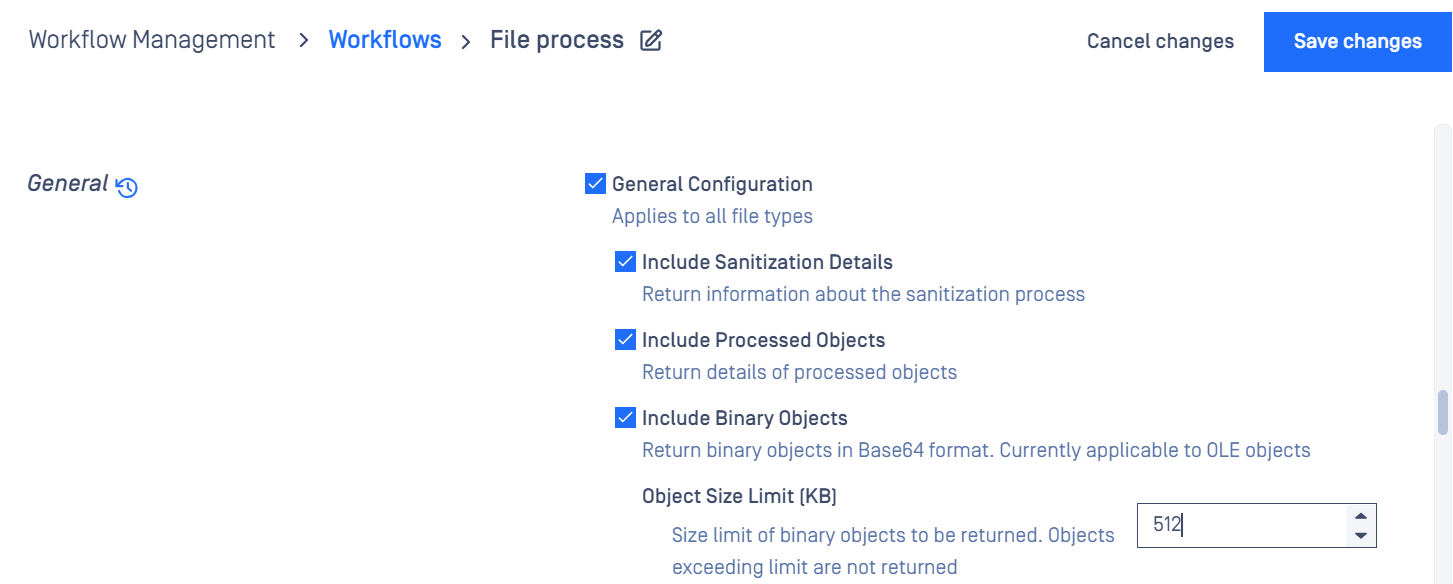
The length of object details is limited to 5000 characters. If it exceeds the limit, it will be truncated.
Sanitization details info is optional, not avaialble in all file types
| Possible action_ran values for Deep CDR | Description |
|---|---|
| Sanitized | File is sanitized successfully. |
| Sanitized Partially | Only applicable to the archive file sanitization, some children files are failed to sanitize. |
| Sanitization Skipped | File is skipped because of the configurations. |
| Sanitization Timeout | Santization process is timeout |
Type to search, ESC to discard
Last updated on
Was this page helpful?
Next to read:
Troubleshooting sanitization failuresDiscard Changes
Do you want to discard your current changes and overwrite with the template?
Archive Synced Block
Message
Create new Template
What is this template's title?
Delete Template
Message
