
An Ignition file could be utilized for either / both of following use-cases:
Pre-define PostgreSQL server information for MetaDefender Core to connect and setup database: only required on Linux installation, or Windows with command line installation. Learn more details at:
Standalone Mode > Command Line Installation ( applicable on version 4.19.0 or newer).
Shared Database Mode > Command Line Installation (only applicable on version 4.20.0 or newer).
Automating to accept EULA, create a default local admin user and import MetaDefender Core configurations upon installed: Those steps could be automated using ignition file described in this page.
Ignition file location to create:
Windows:
C:\OPSWAT\ometascan.confLinux:
/etc/opswat/ometascan.conf
The product supports fully automated deployment. It means that it can be installed and configured with no human interaction.
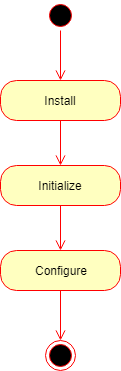
The automated deployment can be split to three steps on a high level:
Installation
Initialization
Configuration
Installation
To automate the installation, install the product from the command line and provide the installation-time options as parameters to the installer. For further details see Command Line Installation
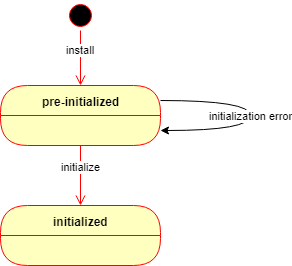
After the installation is complete, the product starts up and waits in a pre-initialized status. The product may be initialized in two ways:
Manually using the Wizard Setup or
Automatically using an ignition file (see below).
If the automated initialization fails for some reason (e.g. the ignition file is not in place) then the automated initialization may be retried after fixing the problem (e.g. placing the ignition file in its lookup location) and restarting the OPSWAT MetaDefender Core service.
Until the product is in pre-initialized status, it will try the automated initialization every time after a service (re)start.
Initialization
Initialization is the process of bringing the product to an operable status.
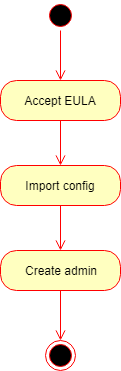
Basically the initialization consists of the following steps:
Accept the End User License Agreement (EULA),
Import product configuration and
Create the first administrator user account.
Ignition file
The initialization process can be configured in a file called the ignition file.
Please check more details if you have special characters in Ignition file: Ignition file - special characters
In Linux, the ignition file and the folder /etc/opswat should have the permission 755 and must be in conf format.
Ignition file location
Windows:
C:\OPSWAT\ometascan.confLinux:
/etc/opswat/ometascan.conf
Example:
Ignition file fields
The ignition file accepts the following fields:
Detailed initialization process
After the product has been started, it looks for the ignition file in the designated location.
Windows:
C:\OPSWAT\ometascan.confLinux:
/etc/opswat/ometascan.conf
If an ignition file is found, then
2.1) It gets validated, and if it is valid, then based on the information found in the ignition file:
The EULA is accepted,
The configuration is imported,
The administrator account is created.
If any of the above steps fails, then the error is logged, and the initialization gets terminated.
In this case the product starts normally: if for example the basic configuration wizard has not been completed yet, then it must be completed first.
2.2) If it is not valid, then the error is logged, and the initialization gets terminated.
In this case the product starts normally: if for example the basic configuration wizard has not been completed yet, then it must be completed first.
If there is no ignition file, then no initialization is performed.
In this case the product starts normally: if for example the basic configuration wizard has not been completed yet, then it must be completed first.
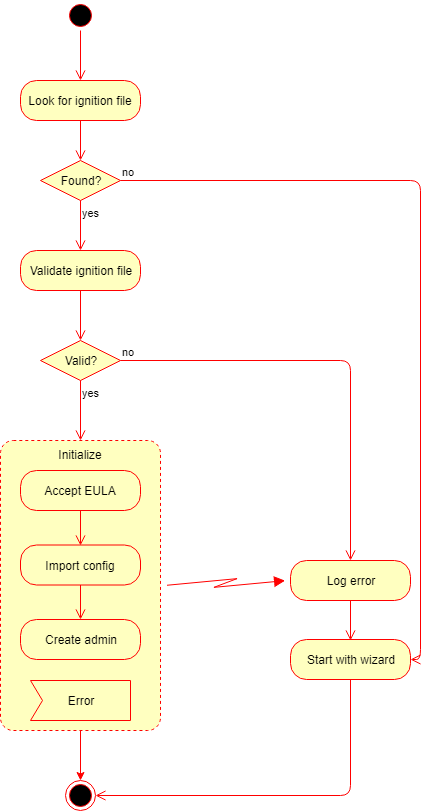
If the automated initialization fails for some reason (e.g. the ignition file is not in place) then the automated initialization may be retried fixing the problem (e.g. placing the ignition file to its lookup location) and restarting the OPSWAT MetaDefender Core service.
Until the product is in pre-initialized status, it will try the automated initialization every time after a service (re)start.
Configuration
After initialization is complete, the product is ready with both the default and imported configurations.
This configuration can be later changed by calling the configuration API functions. For further details about the API, see Configuration related APIs