Air-gapped

Info

Redis version 7.0.5 or higher is required.

Info

To install Redis in an air-gapped environment, download the required packages on a preparation machine and then transfer them to the air-gapped server. The preparation machine should have internet access and run the same operating system version as the target server.

Debian, Ubuntu

Prepare packages

  1. On the preparation machine, run commands.

# add repository sudo apt-get install lsb-release curl gpg curl -fsSL https://packages.redis.io/gpg | sudo gpg --dearmor -o /usr/share/keyrings/redis-archive-keyring.gpg sudo chmod 644 /usr/share/keyrings/redis-archive-keyring.gpg echo "deb [signed-by=/usr/share/keyrings/redis-archive-keyring.gpg] https://packages.redis.io/deb $(lsb_release -cs) main" | sudo tee /etc/apt/sources.list.d/redis.list sudo apt-get update mkdir -p redis && cd redis apt-get download redis=6:8.6.2-1rl1~noble1 \ redis-server=6:8.6.2-1rl1~noble1 \ redis-tools=6:8.6.2-1rl1~noble1 cd ..
  1. Copy the redis folder to a USB drive or secure transfer medium.

  2. Move it to the air-gapped server.

Install Redis

  1. On the target server, insert the USB drive or secure transfer medium.

  2. Run the commands below in the redis folder.

sudo dpkg -i ./*.deb sudo systemctl enable --now redis-server # check redis-server status sudo systemctl status redis-server
  1. Access Redis configuration file /etc/redis/redis.conf for editing.

  2. Comment out the bind setting and set protected-mode option to no.

... # The following line should be commented # bind 127.0.0.1 ... # The following line should be uncommented and set to no protected-mode no ...
  1. Restart Redis.

sudo systemctl restart redis-server
  1. Run the command with Redis CLI.

redis-cli ping
  1. Confirm that the response returned is PONG.

PONG

Rocky, RHEL 9

Prepare packages

  1. On the preparation machine, run commands.

sudo tee /etc/yum.repos.d/redis.repo >/dev/null <<'EOF' [Redis] name=Redis baseurl=http://packages.redis.io/rpm/rockylinux9 enabled=1 gpgcheck=1 EOF curl -fsSL https://packages.redis.io/gpg > /tmp/redis.key sudo rpm --import /tmp/redis.key sudo dnf makecache mkdir -p redis && cd redis dnf download --resolve --alldeps --downloaddir . redis-8.6.2-1.x86_64 cd ..
  1. Copy the redis folder to a USB drive or secure transfer medium.

  2. Move it to the air-gapped server.

Install Redis

  1. On the target server, insert the USB drive or secure transfer medium.

  2. Run the commands below in the redis folder.

sudo dnf install -y ./*.rpm --disablerepo '*' sudo systemctl enable --now redis # check redis-server status sudo systemctl status redis
Warning

Sometimes, other dependencies require upgrading. Example:
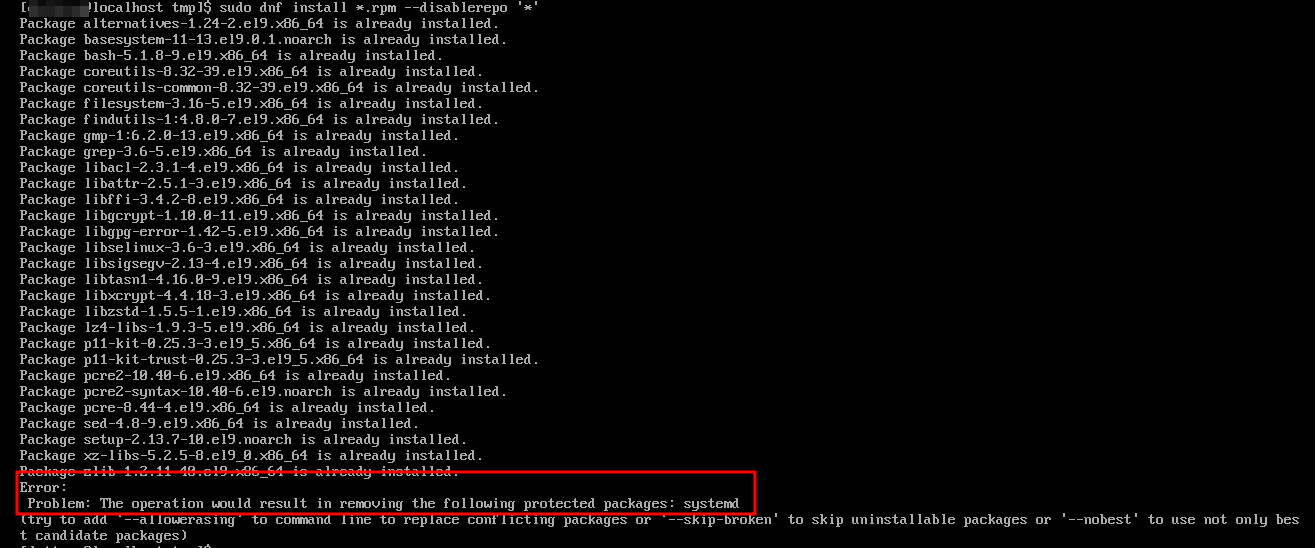

You should manually download the dependencies using the command dnf download --resolve --alldeps --downloaddir . <package_names> . Then copy them to the redis folder and install again.

  1. Access Redis configuration file /etc/redis/redis.conf for editing.

  2. Comment out the bind setting and set protected-mode option to no.

... # The following line should be commented # bind 127.0.0.1 ... # The following line should be uncommented and set to no protected-mode no ...
  1. Restart Redis.

sudo systemctl restart redis
  1. Run the command with Redis CLI.

redis-cli ping
  1. Confirm that the response returned is PONG.

PONG