These results should be viewed as guidelines and not performance guarantees, since there are many variables that affect performance (file set, network configurations, hardware characteristics, etc.). If throughput is important to your implementation, OPSWAT recommends site-specific benchmarking before implementing a production solution.
Factors that affect performance
MetaDefender Cluster version
MetaDefender Core version
MetaDefender Cluster API Gateway, and File Storage version
Workflow settings
System environment (CPU, RAM, hard disk, and network bandwidth)
Dataset
Encrypted or not
File types
Different file types (e.g., document, image, executable)
Archive file or compound document format files
File size
Client tool (the tool submits files to the system)
Performance metrics
While processing files on the system, service performance is measured by various metrics. Some of them are commonly used to define performance levels, including:
Performance metrics | Description |
|---|---|
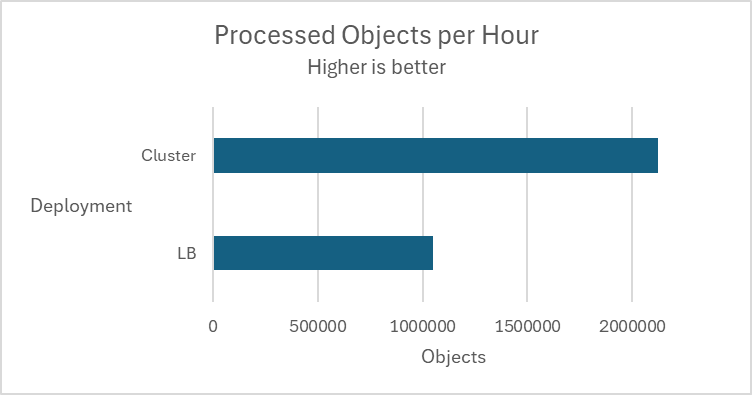
Processed objects per hour | Total individual files that the system has to process. These could be separate original files submitted to the system or extracted files inside an archive. The number of processed objects is considered to be a more accurate throughput metric for measuring performance. |
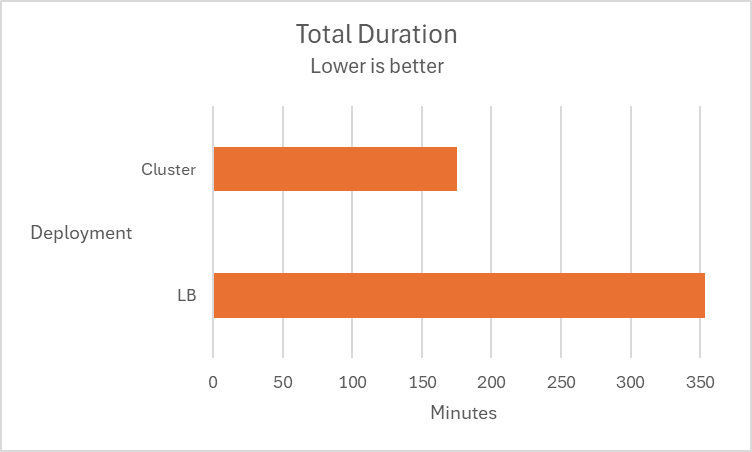
Total duration | Total duration is a typical performance metric for measuring the time it takes to complete the processing of an entire dataset. |
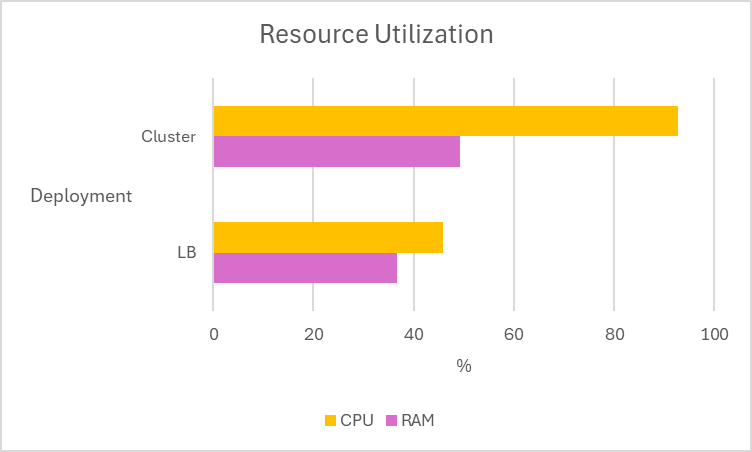
Resource utilization | The average CPU and memory that the system consumes while processing the dataset. |
How test results are calculated
Performance (mainly scanning speed) is measured by throughput rather than unit speed. For example, if it takes 10 seconds to process 1 object, and it also takes 10 seconds to process 10 objects, then performance is quantified as 1 second per object, rather than 10 seconds.
total time / total number of objects processed: 10 seconds / 10 objects = 1 second / object.
Dataset
File category | File type | Number of files | Total size | Average file size |
|---|---|---|---|---|
Document | DOC | 3,820 | 534 MB | 0.14 MB |
Medium archive files | RPM CAB EXE | 50 | Compressed size: 2.8 GB Extracted size: 12.09 GB | Compressed size: 56.02 MB Extracted size: 294 MB |
Big archive files | CAB | 7 | Compressed size: 5.1 GB Extracted size: 217 GB | Compressed size: 715 MB Extracted size: 30.4 GB |
Environment
MD Cluster system
MD Core | File Storage | API Gateway | PostgreSQL | RabbitMQ | Redis | |
|---|---|---|---|---|---|---|
OS | Windows Server 2022 | Rocky Linux 9 | Rocky Linux 9 | Rocky Linux 9 | Rocky Linux 9 | Rocky Linux 9 |
vCPU | 8 | 16 | 4 | 4 | 4 | 4 |
Memory | 16GB | 32GB | 8GB | 8GB | 8GB | 32GB |
Disk size | 300GB | 150GB | 100GB | 100GB | 80GB | 80GB |
Disk I/O | 600 MB/s | 600 MB/s | 600 MB/s | 600 MB/s | 600 MB/s | 600 MB/s |
Network bandwidth | 10 Gbps | 10 Gbps | 10 Gbps | 10 Gbps | 10 Gbps | 10 Gbps |
Client tool
Detail | |
|---|---|
OS | Rocky Linux 9 |
vCPU | 4 |
Memory | 10GB |
Disk size | 80GB |
Disk I/O | 600 MB/s |
Network bandwidth | 10 Gbps |
Product information
MetaDefender Core v5.20.0
Engines:
Metascan 8: Ahnlab, Avira, ClamAV, ESET, Bitdefender, K7, Quick Heal, VirIT Explorer
Archive v8.0.0
File type analysis v8.0.0
MD Cluster Control Center v2.7.0
MD Cluster Identity Service v2.7.0
MD Cluster API Gateway v2.7.0
MD Cluster File Storage v2.7.0
PostgreSQL v16.10
RabbitMQ v3.13.7
Redis v8.2.3
Workflow settings
Archive Extraction settings
Max recursion level: 99999999
Max number of extracted files: 99999999
Max total size of extracted files: 99999999
Timeout: 10 minutes
Handle archive extraction task as Failed: true
Extracted partially: true
Metascan settings
Max file size: 99999999
Scan timeout: 10 minutes
Per engine scan timeout: 1 minutes
General settings
Turn off data retention
Turn off engine update
Scan queue: 1000 (for Load Balancer deployment)
Performance results
Load-balance deployment vs MD Cluster deployment
Multiple tests are conducted using 5 MetaDefender Core instances across two deployment types, MetaDefender Cluster (Cluster) and Load Balancer (LB), to determine the superiority of the MD Cluster in 3 different datasets.
Scenario | Result |
|---|---|
Aggressively submitted 2M non-archive files at a rate of 800 files per second. | 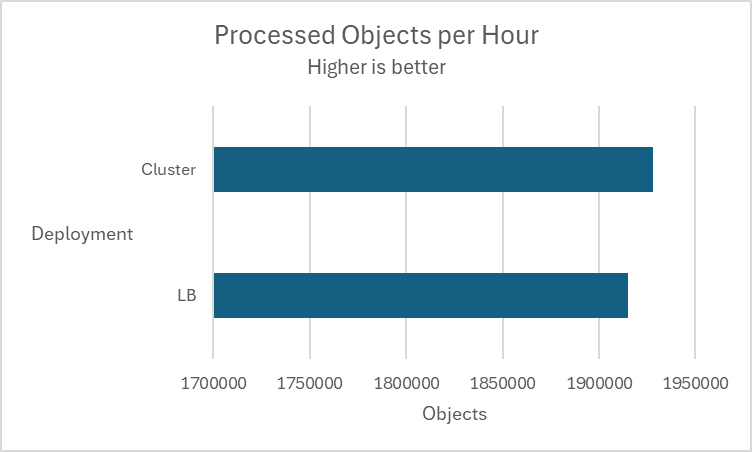 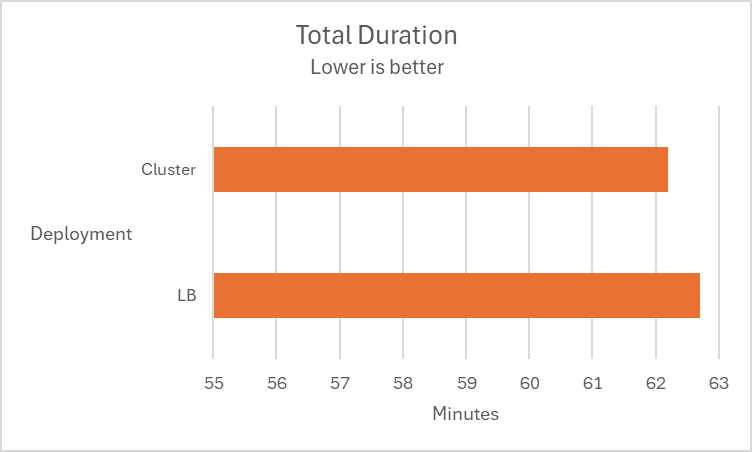 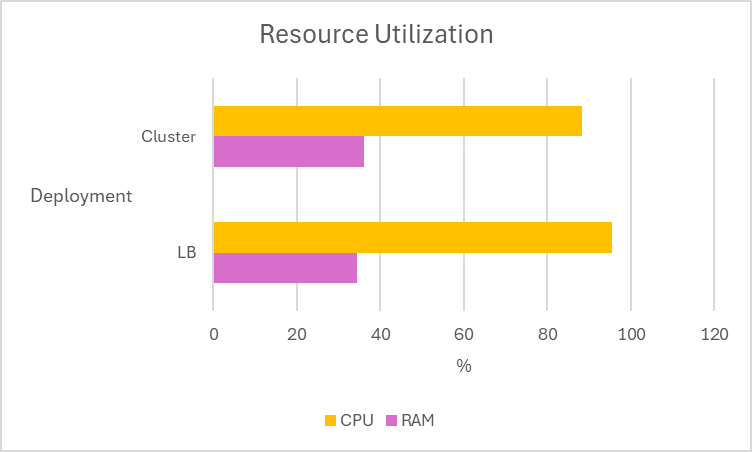 |
Submitted 400 medium archive files at a rate of 1 files per second. | 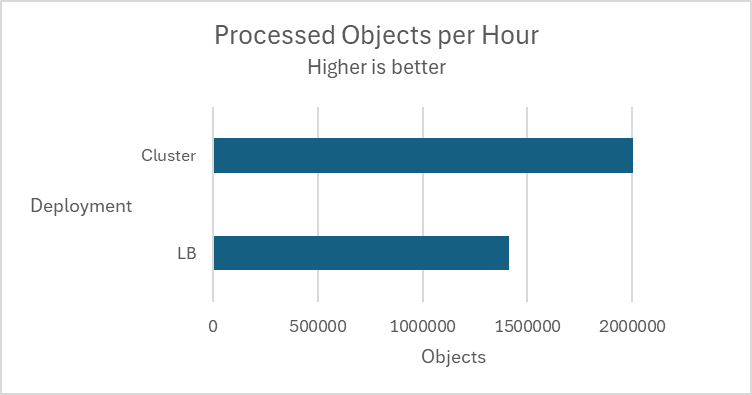 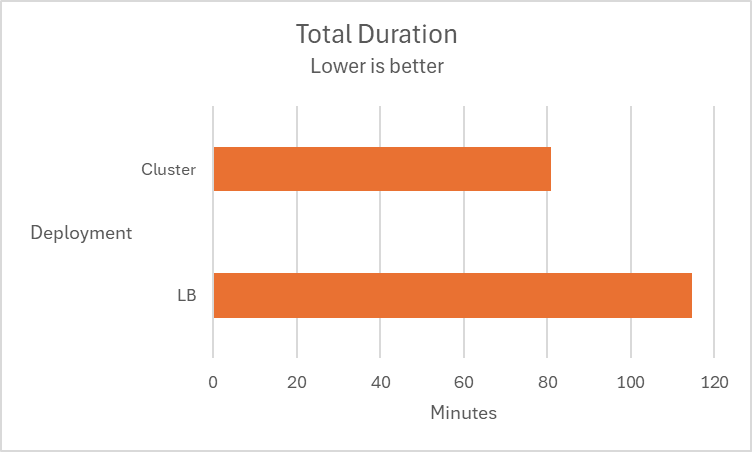 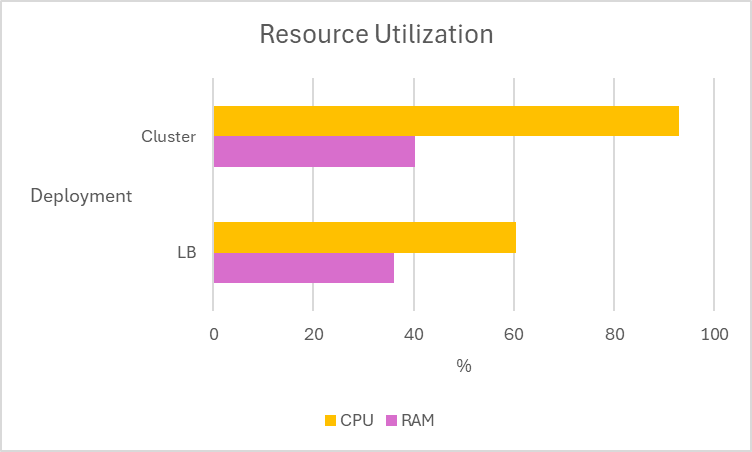 |
Submitted 7 large CAB files Archive distribution (MD Cluster only) In workflow, setting "Load shared among MetaDefender Core instances for archive processing" is enabled.
|    |