
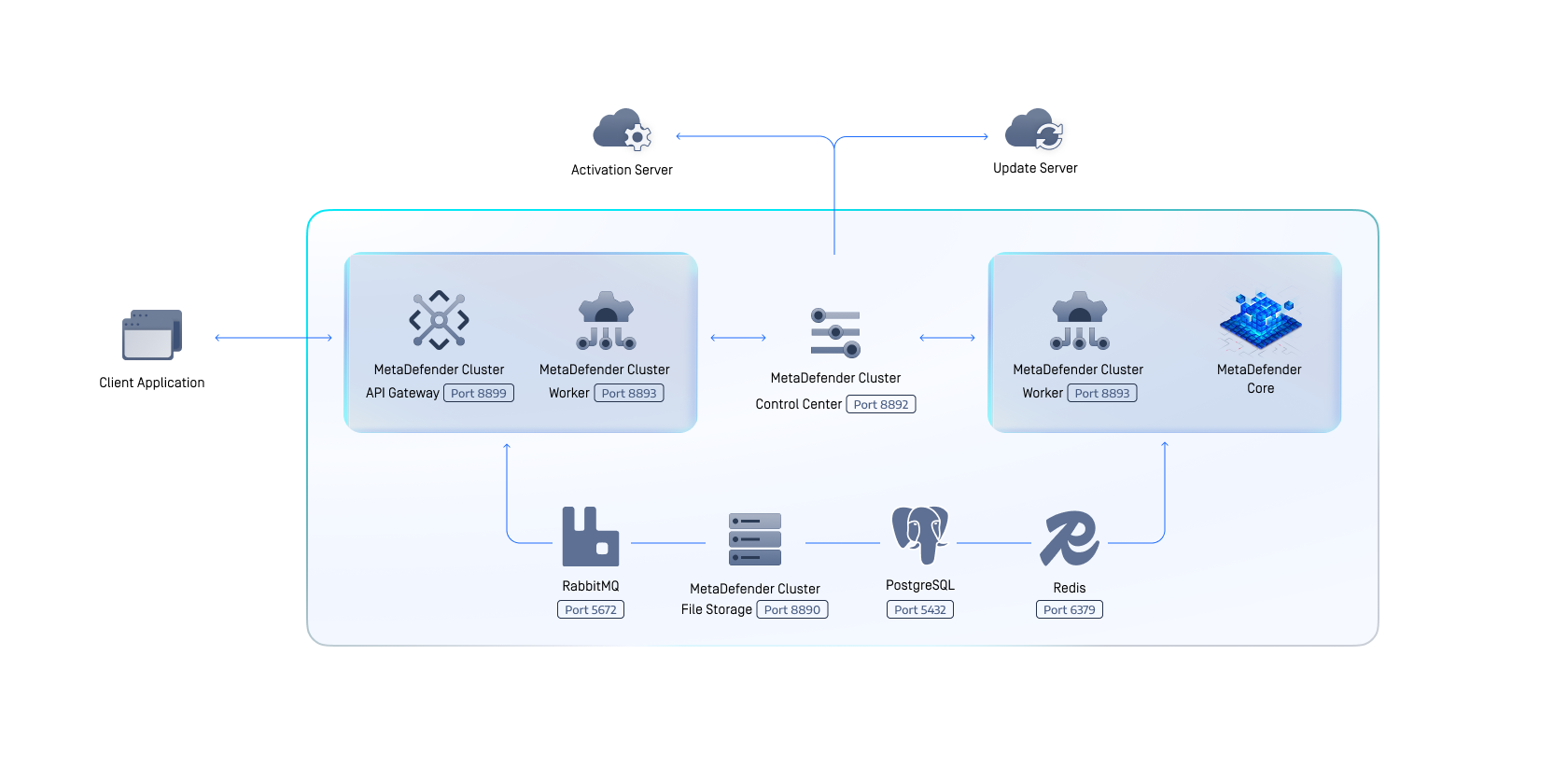
The MetaDefender Cluster (MD Cluster) is an approach to serve very large deployments while offering improved auto-scaling, high availability and fault tolerant capabilities for MetaDefender Core.
The MetaDefender Cluster consists of several components:
Component | Functionalities |
|---|---|
MD Cluster Control Center | Assist administrators with user management, system health monitoring, and deploying or upgrading MetaDefender Core or MD Cluster API Gateway without any downtime. |
MD Cluster Identity Service | Assist MD Cluster Control Center and MD Cluster API Gateway in client authentication, managing user activity sessions and authorization. |
MD Cluster File Storage | Securely store and share files asynchronously across components in the cluster. The component manages the duration and duplication of files. |
MD Cluster Worker | Deploy and monitor activities of MetaDefender Core and MD Cluster API Gateway. |
MD Cluster API Gateway | Accept file scans, fetch scan statuses, and process download requests from clients. |
MetaDefender Core | Scan the accepted files. |
RabbitMQ - Message broker | Receives tasks from MD Cluster API Gateway and forwards them to MetaDefender Core instances for processing. |
Redis - Caching server | Store in-progress results in memory for rapid retrieval. |
PostgreSQL - Database sever | Permanently store scan results, configuration and executive reports. |
The MD Cluster offers users two distinct interfaces. The first is a RESTful interface provided by MD Cluster API Gateway for applications to upload files for scanning, retrieve scan status, download processed files, or abort file scanning. The other is a Web UI provided by MD Cluster Control Center for the system administrator to manage licenses and users, modify workflow configurations, monitor the overall system, and remotely deploy or upgrade MD Cluster API Gateway or MetaDefender Core.
When a file is submitted to the MD Cluster API Gateway for scanning, its body content is securely transmitted to MD Cluster File Storage for subsequent use. API Gateway submits a scan task in RabbitMQ queue, and responds to the application with data_id. The task is delivered to healthy MetaDefender Core instances and one of them will accept the task. The file corresponding to the task is transmitted from MD Cluster File Storage to the instance's local storage, and the processing of the file takes place. Scan results produced by the processing are continuously recorded in Redis for fast retrieval and are finally stored in the PostgreSQL database for long-term storage. If created, the sanitized or watermarked file is securely transmitted to MD Cluster File Storage for future download by MD Cluster API Gateway.
In certain rate situations, if one of the MetaDefender Core instances unexpectedly ceases operation, its 'broken' files are delivered to other MetaDefender Core instances for continued processing without the need for applications to resubmit the files. By leveraging MD Cluster File Storage and RabbitMQ, MetaDefender Core instances within MetaDefender Cluster can collaborate in distributing the workload of archive extraction, greatly decreasing the overall time required to process archive files while utilizing the resources much more efficiently.
Using the Web Console from by MD Cluster Control Center, the system administrator is able to adjust workflow settings centrally and, after which the updates are automatically synced across all MetaDefender Core instances. The administrator can scale out the number of MD Cluster API Gateway or MetaDefender Core instances if additional power is required. He or she can also upgrade the instances seamlessly while the file processing is occurring. All statistical data and health information for components, along with executive reports, can be accessed easily through the Web UI of MD Cluster Control Center.