
In order to enhance our customers' experience, we will be introducing the software release in a phased approach, gradually extending it to different regions as follows:
| Region | When | Time |
|---|---|---|
| US | 4th Wednesday of each month | 03:00AM - 05:00AM (EDT) |
| EU | 3rd Wednesday of each month | 02:00AM - O4:00AM (CEST) |
| CA | 3rd Wednesday of each month | 03:00AM - 05:00AM (EDT) |
| AUS | 4th Monday of each month | 11:00PM - 01:00AM (AEST) |
| JP | 4th Monday of each month | 03:00AM - 05:00AM (JST) |
| IN | 3rd Wednesday of each month | 03:00 AM - 05:00 AM (IST) |
April 2026
| Product Area | Release Type |
|---|---|
| Custom Workflows now available to individual paid users — Paid subscribers who are not part of an organization can now create and maintain custom workflows directly from Workflow Studio. Custom Workflows are no longer limited to organization-based accounts, giving solo professionals the same workflow customization power as teams. Notification subscriptions by scan result code — You can now configure notifications to fire on specific scan result codes, giving you finer-grained control over which scan outcomes trigger an alert. Adaptive Sandbox — IOC verdict columns — Indicators of Compromise lists now include verdict columns, making it easier to interpret sandbox IOC output at a glance. Adaptive Sandbox — Clearer geolocation context — Sandbox results now expose richer geolocation context for analyzed traffic, helping analysts understand where observed activity originated. Multiple passwords for layered archives — When scanning archives that contain nested encrypted archives with different passwords, you can now supply more than one password in a single scan request, removing the need for repeated scans. Analyze page — Default workflow now in the picker — The built-in default workflow now appears in the workflow dropdown alongside your custom workflows, making it easier to switch between default and customized scanning behavior. Licensing page — Clearer copy and layout — Subscription and plan information has been reorganized and reworded for easier reading. Performance improvements across the application — Page load and responsiveness have been improved across the Dashboard, Analyze, and Profile pages through frontend optimization, smarter image loading, and reduced layout shift on key components. Settings now reachable for paid individual users — Users on paid plans without an organization can now reliably access Settings (Profile and Licensing tabs), instead of hitting a Page Not Found error. Unarchiving — Password cleared when option unchecked — Disabling Unarchiving now also clears any previously entered archive password, so it cannot be silently carried into subsequent scans. Engine timeout fields preserve non-round values — Sandbox, antivirus, extraction, Deep CDR, DLP, and file-type timeout values from engine profiles are now displayed and retained correctly, even when they don't map to round minute or hour increments. Engines list — Active status reflects workflow usage — Engines referenced by custom workflows are now correctly marked as Active, instead of incorrectly appearing as inactive. Engines page — Layout no longer clips horizontally — Engine configuration now displays cleanly on supported viewport widths, without horizontal content clipping. Non-ASCII filenames preserved through UI uploads — File names with non-ASCII characters submitted via the UI now preserve their encoding consistently with scans performed via other interfaces. Adaptive Sandbox — Summary aligns with Sandbox verdict — Summary banners now correctly report "No Threat" when the Sandbox returns a clean verdict, instead of showing an undetermined placeholder. Archive extraction — Clearer failure wording — Fail-extraction conditions now display "unsupported extraction method" wording that matches the actual Archive Extraction behavior, making errors easier to interpret. Accessibility improvements — Multiple accessibility fixes have been applied across the application, including readable labels on Profile form inputs, accessible names on Licensing pricing plan controls, improved text contrast on Resources documentation cards in light theme, and removal of nested interactive controls between Licensing and Notifications. |
| Public Maintenance Status API — A new public, read-only endpoint ( Sandbox verdicts on organization scan history — Organization-level scan history now displays Sandbox verdicts inline with engine results, matching the existing behavior on personal scan history. Sandbox events now forwarded to SIEM — Sandbox analysis outcomes for both files and URLs are now included in the SIEM event stream, giving security operations centers complete visibility into sandbox activity alongside other scan events. Improved response time for the file scan API — Reduced internal logging overhead on the Sanitization no longer stuck in Processing for CDR-only archive scans — Resolved intermittent cases where CDR-only archive scans completed at the engine level but appeared stuck in Processing at the platform level (progress frozen near 99%). Sandbox scanning of raw S3 URLs no longer fails — Sandbox scans submitted with a raw S3 URL no longer return an error. Sandbox archive scans no longer miss extracted files — Archive sandbox reports now consistently include all extracted child file entries. Sandbox-only scans no longer leave extracted files In Progress — Extracted artifacts in sandbox-only flows now reach a terminal state instead of remaining at 0% / In Progress indefinitely. SIEM forwarding recovers reliably after upstream failures — Resolved a failure mode where SIEM forwarding workers could become unresponsive following an upstream messaging crash. Workers now terminate and restart correctly. SIEM event delivery to Direct MSK restored — Resolved an issue where SIEM events forwarded to per-tenant could be dropped before reaching the destination. Events now flow reliably to all configured topics. |
| |
| |
|
March 2026
| Product Area | Release Type |
|---|---|
| Custom Workflows — Visual Canvas for Engine Configuration — Security workflows can now be built and managed on an interactive visual canvas. Enable or disable engine nodes individually, configure them via a side drawer, and connect them using conditional routing paths — giving you full control over how files move through your security stack. Multiscanning, Deep CDR, DLP, Sandbox, Archive Extraction, and more are all supported. Custom Workflows — Conditional Allow/Block Nodes — Workflows now support conditional routing nodes that allow or block files based on file size, type (PDF, DOCX, ZIP, EXE, MIME types, etc.), hash, filename pattern, or regex. The right files reach the right engines — and nothing else. Conditional nodes are available before the Sandbox engine and at the final workflow exit. Custom Workflows — Engine Profiles — Engine configurations can now be saved as named, reusable profiles, making it easy to apply consistent settings across multiple workflows without reconfiguring from scratch. Profiles support full create/read/update/delete, version history, duplication, and locking for default and system profiles. Custom Workflows — Engine Profile Summary View — Every engine node on the canvas now displays a clear, human-readable summary of its active configuration — engine count, rules, timeouts, and detected actions — alongside a status badge and an Edit button. Understanding what a workflow is configured to do is now immediate. Custom Workflows on the Analyze Page — Custom workflows are now available directly from the Analyze page. Select any workflow from the dropdown and it's applied as the active scan rule when submitting a file. Organization name now shown in place of raw organization ID — The URL and UI now display the organization's name instead of its internal ID, improving readability across multi-org accounts. Limit notifications now reflect the correct billing interval — Accounts with monthly limits now receive monthly limit reached notifications instead of daily limit messages. "View Advanced Analysis" button disabled until sandbox completes — The button is now unavailable until the sandbox result is successfully generated, preventing users from reaching an infinite loading state if the process is aborted. Sandbox scan results now display correctly on the Threats Prevented page — Sandbox results that previously appeared blank are now rendered correctly. File password correctly included when using drag-and-drop upload — When a user enters an archive password and uploads via drag and drop, the password is now always included in the scan request, ensuring extraction succeeds. Sandbox available for all supported URL types — URL types supported for sandbox analysis are no longer incorrectly restricted in the UI. The sandbox option is now available for all eligible URLs. File sizes now displayed in decimal units — File sizes are displayed using decimal units (1 MB = 1,000,000 bytes), matching documented behavior and user expectations. "User Removed from Organization" notification now saves correctly — A missing field in the request payload was preventing this notification setting from being persisted. Changes now save as expected. Duplicate limit notification no longer shown — When reputation limit consumption reached 50%, two identical notifications appeared in the dropdown. Only one notification is now shown. Dragging a deleted file no longer causes infinite loading — If a user drags a previously downloaded file that has since been deleted into the upload area, the UI now correctly identifies the file as inaccessible and does not attempt to initiate a scan. Deep CDR — File Type settings expanded and aligned — File Type engine configuration now matches the full set of supported backend options. Obsolete or non-functional fields have been removed, and additional controls are now exposed where relevant — including fallback behavior, detection options, and block/classification settings. Workflow conditional routing — Stricter validation on Allow paths — Conditional Allow paths in workflows now reject invalid filename patterns at configuration time. Misconfigurations are caught in the UI before they reach a scan. Clearer error message for unsupported IP scans — IP scan requests that the API cannot process now return a clear, descriptive message in the UI instead of a generic failure. Custom scan options — Missing engine selection now flagged — If no scanning engine is selected when submitting a custom scan, the UI now surfaces a proper validation error instead of silently defaulting to a multiscan profile. Custom scan options — Unarchiving now combines correctly with other engines — When Unarchiving is selected alongside Deep CDR, Sandbox, DLP, and/or Private Scan, the resulting scan now correctly reflects the full combination of selected options. Stripe checkout redirect corrected — Users are now sent to the expected post-purchase page after completing Stripe checkout, instead of an incorrect destination. Sandbox threat indicators restored — Threat indicators that were missing from the Sandbox results view are now displayed again. Drag-and-drop no longer triggers unintended scans — Dragging certain UI icons into the upload area no longer initiates a scan. Sanitization page — Duplicate block removed and capitalization corrected — A duplicate "Unused Objects" block has been removed, and inconsistent capitalization on type section headers has been fixed. Scan result cards — Consistent formatting — Button text formatting is now consistent across scan result cards, and "Download Sanitized Data" uses the correct icon. OAuth2 clients — Pagination fixed — Pagination on the OAuth2 clients page now works as expected. RSA key — Corrected error message — The error message shown for invalid or problematic RSA key input has been corrected. Rename Workflow dialog — Stable layout — The Rename Workflow dialog no longer resizes or jumps while typing the new name. Deep CDR File Type Settings — Layout overlap resolved — Overlapping text and controls on the Deep CDR File Type Settings panel have been resolved; labels and controls are now readable. Archive child file names — Clearer truncation — File names for archive child files now use end truncation instead of middle truncation in the side menu, making them easier to read at a glance. postMessage integration for embedded UI — When MetaDefender Cloud is embedded as an iframe within a parent site, the embedded UI now broadcasts navigation and usage events to the parent page via NPS feedback banner — A Net Promoter Score feedback banner is now available on the dashboard, making it easier to share product feedback directly from within the application. Japanese localization improvements — Additional UI strings are now translated when the interface language is set to Japanese, reducing remaining English text on key screens. Sanitization Details — Consistent dark theme styling — The Sanitization Details view now uses the same card and hover styling as the Data Loss Prevention Details view in dark theme, for visual consistency. Advanced Analysis — Stable tab URLs — Tab state on the Advanced Analysis page now uses a single, normalized URL parameter; switching tabs no longer accumulates duplicate parameters in the address bar. Adaptive Sandbox workflow node — Timeout displayed correctly — The timeout value shown on the Adaptive Sandbox workflow node now matches the selected profile, and related labels have been updated for clarity. Conditional workflow node — Layout no longer overflows — Long hash values and filenames entered in "Add file hashes to allow" and "Add filenames to block" now stay within the layout without overflowing. |
| Prevention API — Unified consumption per file — When using engines bundled in the Prevention API package (Multiscanning, Deep CDR, DLP, Country of Origin), only a single API call is now consumed per file. Previously, Deep CDR consumed an additional Prevention limit, leading to higher-than-expected quota usage. Private processing now inherited by sub-organizations — When a sub-organization is created under a parent that has private processing enabled, the setting is now automatically applied to the new sub-organization — no manual configuration needed. Limit-reached notifications now respect the configured billing interval — API keys with monthly limits no longer receive misleading "daily limit" notifications. Alerts now align with each account's actual billing cycle. Splunk forwarding restored — Resolved an issue where the Splunk destination failed to receive scan event payloads. Forwarding now works reliably, and payload formatting has been validated across all supported SIEM destinations. Hash lookup returns the correct verdict for DLP results — In certain cases, hash lookups returned a stale verdict from a previous scan instead of the current evaluation. The correct, current result is now returned. Sandbox reports no longer return empty for certain files — Cases where sandbox analysis returned blank reports for specific files have been resolved. Hash lookup on rescanned encrypted archives no longer returns "not found" — Inner files of rescanned encrypted archives are now correctly returned by hash lookup, instead of erroring out as if they didn't exist. |
| |
| |
|
February 2026
| Product Area | Release Type |
|---|---|
| |
| SIEM integrations: Microsoft Sentinel and ServiceNow Security events and scan results from MD Cloud can now be routed directly to Microsoft Sentinel or ServiceNow, feeding your existing SOC workflows without manual export steps. Setup requires connector configuration and credential provisioning on your end — see the integration guide before enabling. Per-file sandbox results and lighter reporting Sandbox scans now return individual verdicts and report URLs for each file, replacing single oversized archive reports. Results are faster to review, easier to act on, and more focused — especially for container content with multiple files. Org-wide scan report visibility Users within your organization can now view scan reports generated by their teammates, subject to your org's access policies. No more re-running scans or manually sharing results to give colleagues visibility during investigations. Workflow inheritance for sub-organizations Workflows defined at the parent organization level can now be propagated to sub-organizations automatically. New teams and business units inherit the right configuration from the start, reducing setup time and keeping policies consistent across your org hierarchy. File size enforcement for sandbox scans Sandbox scans now enforce the file size limits set in your configuration. Files that exceed the threshold are skipped or return a clear status, keeping sandbox capacity protected and scan behavior predictable. Quota accuracy for password-protected archive scans
Archive scans submitted with the Sandbox reliability in the |
| |
| |
|
January 2026
| Product Area | Release Type |
|---|---|
| |
|
|
| TO BE ADDED | |
| TO BE ADDED | |
| TO BE ADDED |
December 2025
| Product Area | Release Type |
|---|---|
|
|
|
|
| TO BE ADDED | |
| TO BE ADDED | |
| TO BE ADDED |
November 2025
| Product Area | Release Type | |
|---|---|---|
|
| |
|
| |
| TO BE ADDED | ||
| TO BE ADDED | ||
| TO BE ADDED |
October 2025
| Product Area | Release Type | |
|---|---|---|
|
| |
|
| |
| TO BE ADDED | ||
| TO BE ADDED | ||
| TO BE ADDED |
September 2025
| Product Area | Release Type | |
|---|---|---|
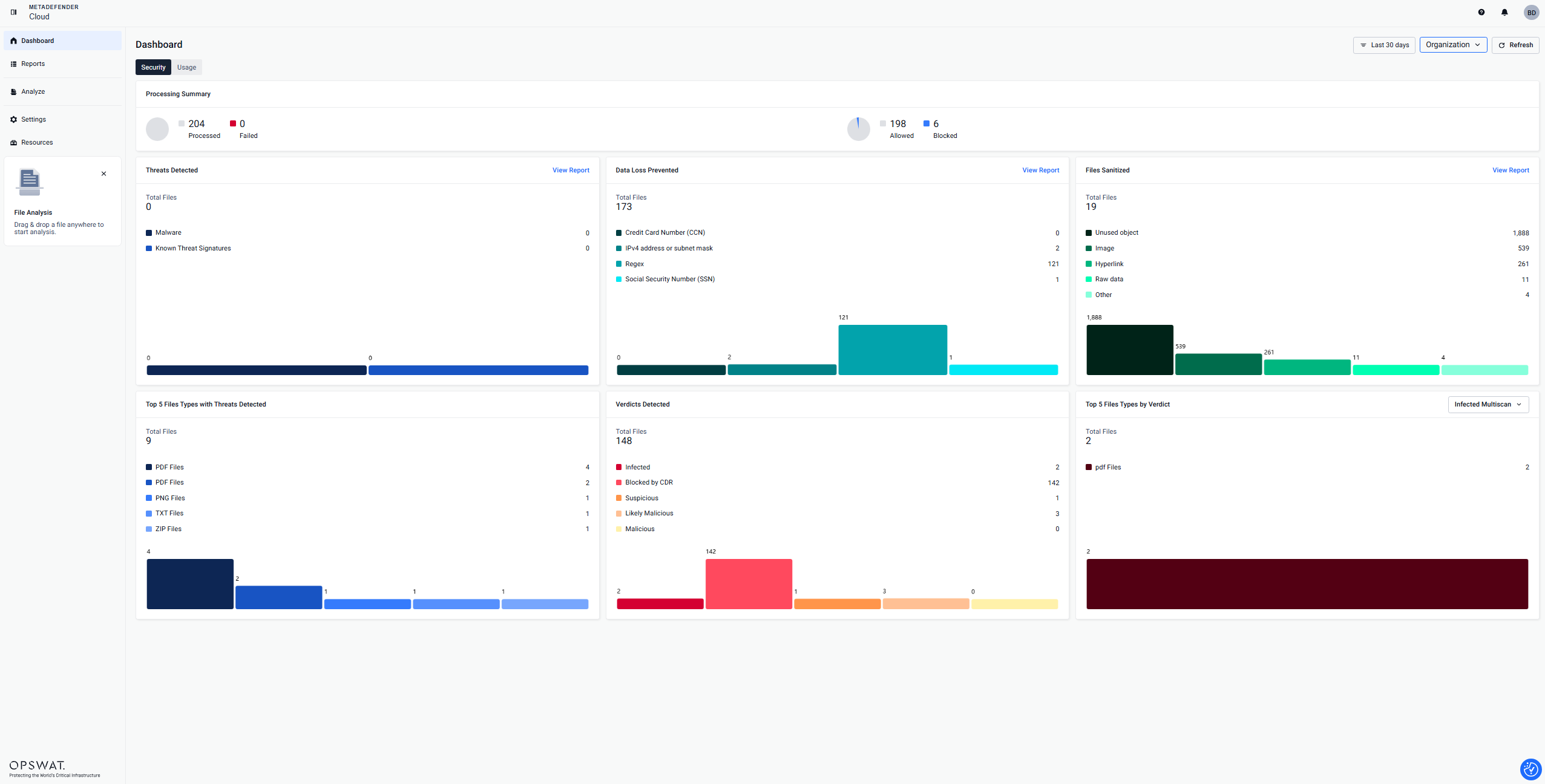
| We’re excited to announce a complete overhaul of our metadefender.opswat.com user interface. We rethought the entire UI to make navigation easier and your day-to-day use more seamless.
| |
|
| |
| TO BE ADDED | ||
| TO BE ADDED | ||
| TO BE ADDED |
August 2025
| Product Area | Release Type | |
|---|---|---|
| Nothing this month | |
|
| |
| Nothing this month | ||
| Nothing this month | ||
| Nothing this month |
July 2025
| Product Area | Release Type | |
|---|---|---|
|
| |
|
| |
| Nothing this month | ||
| Nothing this month | ||
| Nothing this month |
| Product Area | Release Type | |
|---|---|---|
|
| |
|
| |
| Nothing this month | ||
| Nothing this month | ||
| Nothing this month |
June 2025
| Product Area | Release Type | |
|---|---|---|
|
| |
|
| |
| Nothing this month | ||
| Nothing this month | ||
| Nothing this month |
May 2025
| Product Area | Release Type | |
|---|---|---|
|
| |
|
| |
| Nothing this month | ||
| Nothing this month | ||
| Nothing this month |
April 2025
| Product Area | Release Type | |
|---|---|---|
|
| |
|
| |
| Nothing this month | ||
| Nothing this month | ||
| Nothing this month |
March 2025
| Product Area | Release Type | |
|---|---|---|
|
1.93.1
1.93.1
| |
|
| |
| Nothing this month | ||
| Nothing this month | ||
| Nothing this month |
February 2025
| Product Area | Release Type | |
|---|---|---|
|
| |
|
| |
| ||
| Nothing this month |
January 2025
| Product Area | Release Type | |
|---|---|---|
|
| |
|
| |
| Nothing this month | ||
| Nothing this month | ||
| Nothing this month |
December 2024
| Product Area | Release Type | |
|---|---|---|
|
| |
|
| |
| Nothing this month | ||
|
| |
| Nothing this month |
November 2024
| Product Area | Release Type | |
|---|---|---|
| 1.86.0
1.87.0
1.86.0
1.87.0
| |
|
| |
| Nothing this month | ||
| Nothing this month | ||
| Nothing this month |
October 2024
| Product Area | Release Type |
|---|---|
|
|
|
|
| Nothing this month | |
| Nothing this month | |
|
September 2024
| Product Area | Release Type |
|---|---|
|
|
|
|
| Nothing this month | |
| Nothing this month |
August 2024
| Product Area | Release Type |
|---|---|
| 1.82.0
|
|
|
| |
| Nothing this month |
July 2024
| Product Area | Release Type |
|---|---|
$inline[badge,metadefender.opswat.com,primary]
| $inline[badge,New Features and Enhancements,success] 1.80.0
1.80.1
$inline[badge,Fixed,error]
|
$inline[badge,API,primary]
| $inline[badge,New Features and Enhancements,success]
$inline[badge,Fixed,error]
|
| $inline[badge,Menlo Plugin,primary] | Nothing this month |

June 2024
| Product Area | Release Type |
|---|---|
$inline[badge,metadefender.opswat.com,primary]
| $inline[badge,New Features and Enhancements,success]
$inline[badge,Fixed,error]
|
$inline[badge,API,primary]
| $inline[badge,New Features and Enhancements,success]
$inline[badge,Fixed,error]
|
| $inline[badge,Menlo Plugin,primary] | Nothing this month |
May 2024
| Product Area | |
|---|---|
$inline[badge,metadefender.opswat.com,primary]
| $inline[badge,New Features and Enhancements,success]
$inline[badge,Fixed,error]
|
$inline[badge,API,primary]
| $inline[badge,New Features and Enhancements,success]
$inline[badge,Fixed,error]
|
| $inline[badge,Menlo Plugin,primary] | Nothing this month |
April 2024
| Product Area | Release Type |
|---|---|
$inline[badge,metadefender.opswat.com,primary]
| $inline[badge,New Features,success]
|
$inline[badge,API,primary]
| $inline[badge,New Features,success]
$inline[badge,Fixed,error]
|
| $inline[badge,Menlo Plugin,primary] | Nothing this month |
March 2024
| Product Area | Release Type |
|---|---|
$inline[badge,metadefender.opswat.com,primary]
| $inline[badge,New Features,success] $inline[badge,Fixed,error] |
$inline[badge,API,primary]
| $inline[badge,New Features,success] $inline[badge,Fixed,error]
|
| $inline[badge,Menlo Plugin,primary] | Nothing this month |
February 2024
| Product Area | Release Type |
|---|---|
$inline[badge,metadefender.opswat.com,primary]
| $inline[badge,New Features,success] $inline[badge,Fixed,error]
|
$inline[badge,API,primary]
| $inline[badge,New Features,success] $inline[badge,Fixed,error]
|
| $inline[badge,Menlo Plugin,primary] | Nothing this month |
January 2024
| Product Area | Release Type |
|---|---|
$inline[badge,metadefender.opswat.com,primary]
| $inline[badge,New Features,success] $inline[badge,Fixed,error]
$inline[badge,Fixed,error]
|
$inline[badge,API,primary]
| $inline[badge,New Features,success] $inline[badge,Fixed,error]
|
| $inline[badge,Menlo Plugin,primary] | Nothing this month |
December 2023
| Product Area | Release Type |
|---|---|
$inline[badge,metadefender.opswat.com,primary]
| $inline[badge,New Features,success] DLP PDF Export:
Object Details Upgrade:
$inline[badge,Fixed,error]
|
$inline[badge,API,primary]
| $inline[badge,New Features,success]
$inline[badge,Fixed,error]
|
| $inline[badge,Menlo Plugin,primary] | Nothing this month |
November 2023
| Product Area | Release Type |
|---|---|
$inline[badge,metadefender.opswat.com,primary]
| $inline[badge,New Features,success]
$inline[badge,Fixed,error]
|
$inline[badge,API,primary]
| $inline[badge,New Features,success]
$inline[badge,Fixed,error]
|
| $inline[badge,Menlo Plugin,primary] | Nothing this month |
October 2023
| Product Area | Release Type |
|---|---|
$inline[badge,metadefender.opswat.com,primary]
| $inline[badge,New Features,success]
$inline[badge,Fixed,error]
|
$inline[badge,API,primary]
| $inline[badge,New Features,success]
$inline[badge,Fixed,error]
|
| $inline[badge,Menlo Plugin,primary] | Nothing this month |
September 2023
| Product Area | Release Type |
|---|---|
$inline[badge,metadefender.opswat.com,primary]
| $inline[badge,New Features,success]
$inline[badge,Fixed,error]
|
$inline[badge,API,primary]
| $inline[badge,New Features,success]
$inline[badge,Fixed,error]
|
| $inline[badge,Menlo Plugin,primary] | Nothing this month |
August 2023
| Product Area | Release Type |
|---|---|
$inline[badge,metadefender.opswat.com,primary]
| $inline[badge,New Features,success]
$inline[badge,Fixed,error]
|
$inline[badge,API,primary]
| $inline[badge,New Features,success] $inline[badge,Fixed,error] |
| $inline[badge,Menlo Plugin,primary] | Nothing this month |
July 2023
| Product Area | Release Type |
|---|---|
$inline[badge,metadefender.opswat.com,primary]
| $inline[badge,New Features,success]
$inline[badge,Fixed,error]
|
$inline[badge,API,primary]
| $inline[badge,New Features,success]
$inline[badge,Fixed,error]
|
| $inline[badge,Menlo Plugin,primary] | Nothing this month |
June 2023
| Product Area | Release Type |
|---|---|
$inline[badge,metadefender.opswat.com,primary]
| $inline[badge,New Features,success]
$inline[badge,Fixed,error]
|
$inline[badge,API,primary]
| $inline[badge,New Features,success]
$inline[badge,Fixed,error]
|
| $inline[badge,Menlo Plugin,primary] | Nothing this month |
May 2023
| Product Area | Release Type |
|---|---|
$inline[badge,metadefender.opswat.com,primary]
| $inline[badge,New Features,success]
$inline[badge,Fixed,error] |
$inline[badge,API,primary]
| $inline[badge,New Features,success]
$inline[badge,Fixed,error]
|
| $inline[badge,Menlo Plugin,primary] | Nothing this month |
April 2023
| Product Area | Release Type |
|---|---|
$inline[badge,metadefender.opswat.com,primary]
| $inline[badge,New Features,success]
$inline[badge,Fixed,error]
|
$inline[badge,API,primary]
| $inline[badge,New Features,success]
$inline[badge,Fixed,error]
|
$inline[badge,Menlo Plugin,primary]
| $inline[badge,New Features,success]
$inline[badge,Fixed,error]
|
March 2023
| Product Area | Release Type |
|---|---|
$inline[badge,metadefender.opswat.com,primary]
| $inline[badge,New Features,success]
$inline[badge,Fixed,error]
|
$inline[badge,API,primary]
| $inline[badge,New Features,success]
$inline[badge,Fixed,error]
|
$inline[badge,Menlo Plugin,primary]
| $inline[badge,New Features,success] $inline[badge,Fixed,error]
|
February 2023
| Product Area | Release Type |
|---|---|
$inline[badge,metadefender.opswat.com,primary]
| $inline[badge,New Features,success]
$inline[badge,Fixed,error]
|
$inline[badge,API,primary]
| $inline[badge,New Features,success]
$inline[badge,Fixed,error]
|
| $inline[badge,Menlo Plugin,primary] | Nothing this month |
January 2023
| Product Area | Release Type |
|---|---|
| $inline[badge,metadefender.opswat.com,primary] | Nothing this month |
$inline[badge,API,primary]
| $inline[badge,New Features,success]
$inline[badge,Fixed,error]
|
| $inline[badge,Menlo Plugin,primary] | Nothing this month |
December 2022
| Product Area | Release Type |
|---|---|
$inline[badge,metadefender.opswat.com,primary]
| $inline[badge,Notice,warning]
$inline[badge,Fixed,error]
|
$inline[badge,API,primary]
| $inline[badge,New Features,success]
$inline[badge,Fixed,error]
|
| $inline[badge,Menlo Plugin,primary] | Nothing this month |
November 2022
| Product Area | Release Type |
|---|---|
| $inline[badge,metadefender.opswat.com,primary] | No updates this month |
$inline[badge,API,primary]
| $inline[badge,New Features,success]
$inline[badge,Fixed,error]
|
$inline[badge,Menlo Plugin,primary]
| $inline[badge,Fixed,error]
|
October 2022
| Product Area | Release Type |
|---|---|
$inline[badge,metadefender.opswat.com,primary]
| $inline[badge,Fixed,error]
|
$inline[badge,API,primary]
| $inline[badge,New Features,success]
$inline[badge,Fixed,error]
|
$inline[badge,Menlo Plugin,primary]
| $inline[badge,New Features,success]
$inline[badge,Fixed,error]
|
| Product Area | Release Type |
|---|---|
$inline[badge,metadefender.opswat.com,primary]
| $inline[badge,Fixed,error]
|
$inline[badge,API,primary]
| $inline[badge,New Features,success]
$inline[badge,Fixed,error]
|
$inline[badge,Menlo Plugin,primary]
| $inline[badge,New Features,success]
$inline[badge,Fixed,error]
|
September 2022
| Product Area | Release Type |
|---|---|
$inline[badge,metadefender.opswat.com,primary]
| $inline[badge,New Features,success]
$inline[badge,Fixed,error]
|
$inline[badge,API,primary]
| Nothing |
$inline[badge,Menlo Plugin,primary]
| $inline[badge,New Features,success]
$inline[badge,Fixed,error]
|
August 2022
| Product Area | Release Type |
|---|---|
$inline[badge,metadefender.opswat.com,info]
| $inline[badge,New Features,success]
$inline[badge,Fixed,error]
|
$inline[badge,API,primary]
| Nothing |
July 2022
| Product Area | Release Type |
|---|---|
$inline[badge,metadefender.opswat.com,info]
| $inline[badge,New Features,success]
$inline[badge,Fixed,error]
|
$inline[badge,API,primary]
| $inline[badge,New Features,success]
|
June 2022
| Product Area | Release Type |
|---|---|
$inline[badge,metadefender.opswat.com,info]
| $inline[badge,Fixed,error]
|
$inline[badge,API,primary]
| $inline[badge,Fixed,error]
$inline[badge,New Features,success]
|
May 2022
| Product Area | Release Type |
|---|---|
$inline[badge,metadefender.opswat.com,info]
| $inline[badge,New Features,success]
$inline[badge,Fixed,error]
|
$inline[badge,API,primary]
| $inline[badge,Fixed,error]
|
April 2022
| Product Area | Release Type |
|---|---|
$inline[badge,metadefender.opswat.com,info]
| $inline[badge,New Features,success]
|
$inline[badge,API,primary]
| $inline[badge,Fixed,error]
|
March 2022
| Product Area | Release Type |
|---|---|
$inline[badge,metadefender.opswat.com,info]
| $inline[badge,New Features,success]
$inline[badge,Fixed,error]
|
$inline[badge,API,primary]
| $inline[badge,Fixed,error]
|
February 2022
| Product Area | Release Type |
|---|---|
$inline[badge,metadefender.opswat.com,info]
| $inline[badge,New Features,success]
$inline[badge,Fixed,error]
|
$inline[badge,API,primary]
| $inline[badge,Fixed,error]
|
January 2022
| Product Area | Release Type |
|---|---|
$inline[badge,metadefender.opswat.com,info]
| $inline[badge,New Features,success]
$inline[badge,Fixed,error]
|
| $inline[badge,API,primary] | No release notes this month |
December 2021
| Product Area | Release Type |
|---|---|
$inline[badge,metadefender.opswat.com,info]
| $inline[badge,New Features,success]
$inline[badge,Fixed,error]
|
$inline[badge,API,primary]
| $inline[badge,New Features,success]
$inline[badge,Fixed,error]
|
| Product Area | Release Type |
|---|---|
$inline[badge,metadefender.opswat.com,info]
| $inline[badge,New Features,success]
$inline[badge,Fixed,error]
|
$inline[badge,API,primary]
| $inline[badge,New Features,success]
$inline[badge,Fixed,error]
|
November 2021
| Product Area | Release Type |
|---|---|
$inline[badge,metadefender.opswat.com,info]
| $inline[badge,New Features,success]
$inline[badge,Fixed,error]
|
$inline[badge,API,primary]
| $inline[badge,Fixed,error]
|
October 2021
No releases
September 2021
| Product Area | Release Type |
|---|---|
$inline[badge,metadefender.opswat.com,info]
| $inline[badge,Fixed,error]
|
$inline[badge,API,info]
| $inline[badge,New Features,success]
$inline[badge,Fixed,error]
|