Configuration
nac_v8.2.0
Search this version
Configuration
Configuration
Title
Message
Create new category
What is the title of your new category?
Edit page index title
What is the title of the page index?
Edit category
What is the new title of your category?
Edit link
What is the new title and URL of your link?
Configure RADIUS Server for Out-of-Line Mode (Not Used)
Copy Markdown
Open in ChatGPT
Open in Claude
Step-by-step guide
If the RADIUS Server will be configured for Direct or Proxy mode, this section can be skipped.
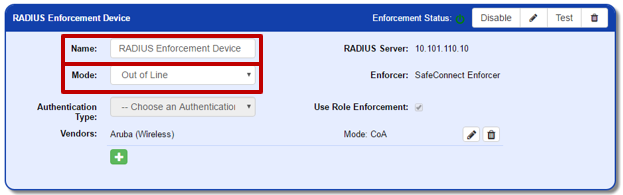
In the top section of the RADIUS server configuration, set the following values:
- Name: A label to help describe this RADIUS server
- Mode: Proxy

Under ‘Vendors’, click the green add icon to add your wireless vendor. After choosing the Vendor from the list, select “COA” as the enforcement mode.
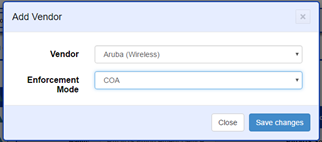
Aruba Wireless is currently the only Vendor where Out-of-Line mode is supported.
Related articles
Error rendering macro 'contentbylabel' : parameters should not be empty
Type to search, ESC to discard
Last updated on
Was this page helpful?
Next to read:
Configure LDAP authenticationDiscard Changes
Do you want to discard your current changes and overwrite with the template?
Archive Synced Block
Message
Create new Template
What is this template's title?
Delete Template
Message