
Before enabling Anti-Keylogger and Screen Capture Protection please confirm that your license key includes these two features. Once this has been verified, please follow the steps below to enable these two features. If you are unable to verify these, please reach out to OPSWAT Support for further assistance, and provide your license key.
To enable Anti-Keylogger and Screen Capture Protection in My OPSWAT Central Management please follow the below steps:
Log in to your My OPSWAT Central Management console
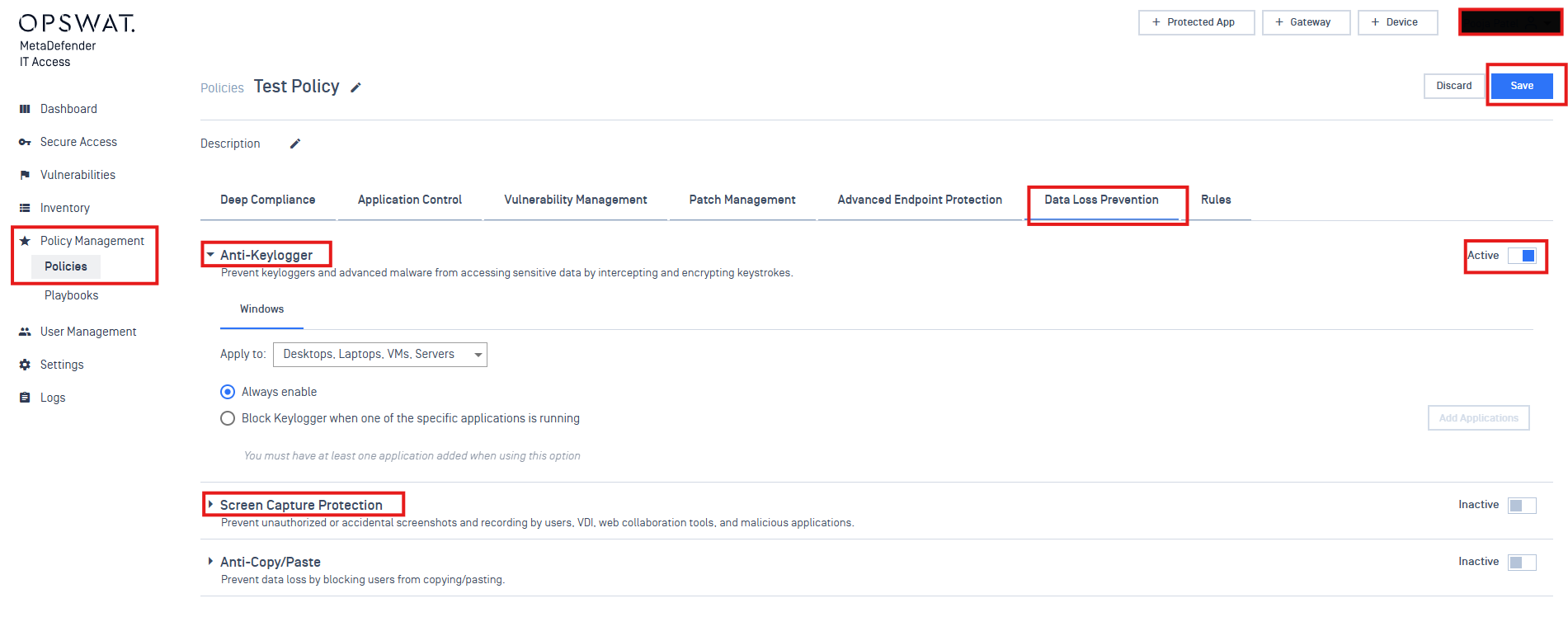
Click on Policy Management
Click on Policies
Click on the Data Loss Prevention tab
From here you can see the option to configure Anti-Keylogger and Screen Capture Protection
By default, these settings are set as Inactive. Click on the Inactive toggle to Activate it.
Click on the down-down to configure the settings as needed
Click on Save in the top right corner.
If Further Assistance is required, please proceed to log a support case or chatting with our support engineer.