
This article is applied to My OPSWAT Central Management releases deployed on Windows and Linux systems.
Issue: Update emails for My OPSWAT Central Management contain references to many different OPSWAT products, which can be confusing for customers.
Resolution: To identify updates relevant to My OPSWAT Central Management, follow these steps:
Search the Email: Look for the terms "Endpoint Security" or "Secure Access" within the update email.
Assess Relevance: If either "Endpoint Security" or "Secure Access" appears prominently in the email, the update likely contains information relevant to MD IT Access.
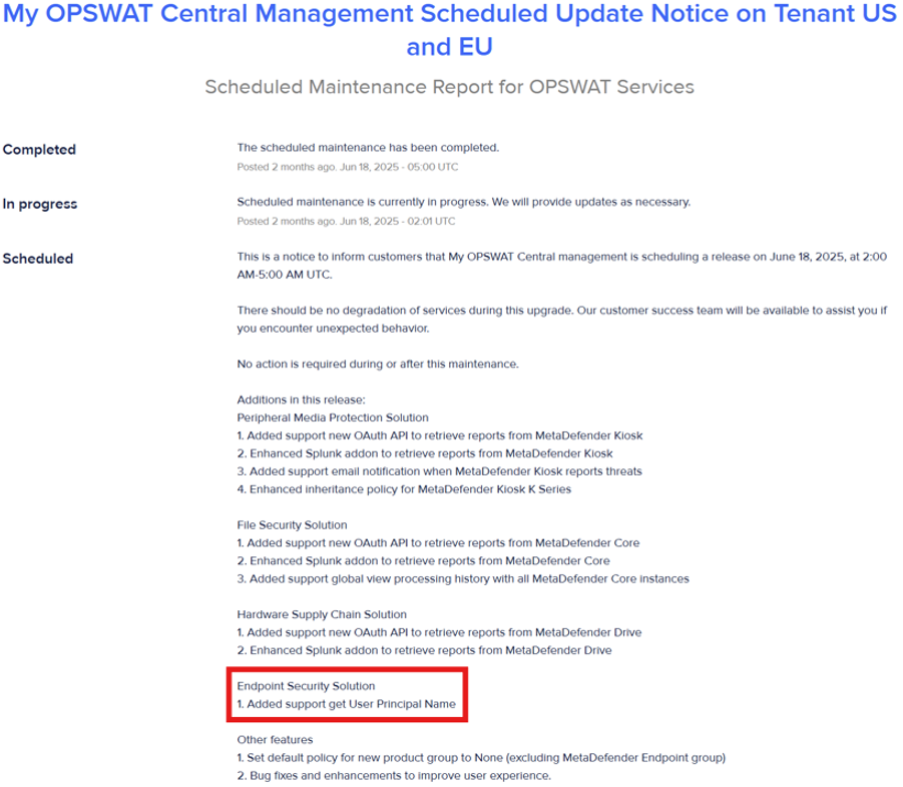
No Relevant Updates: If neither term is found, it is likely that there are no major updates to MD IT Access functionality in that particular email.
If Further Assistance is required, please proceed to log a support case or chat with our support engineer.