
Here you will find the Maintenance settings inside the Settings section part.
Admin Panel > Settings > Configurations > Functionality Extensions > Maintenance
These sections are useful for managing user experience during periods of system maintenance, troubleshooting, or updates. They provide a way to inform users about feature unavailability while also offering clarity regarding the reason for the issue.
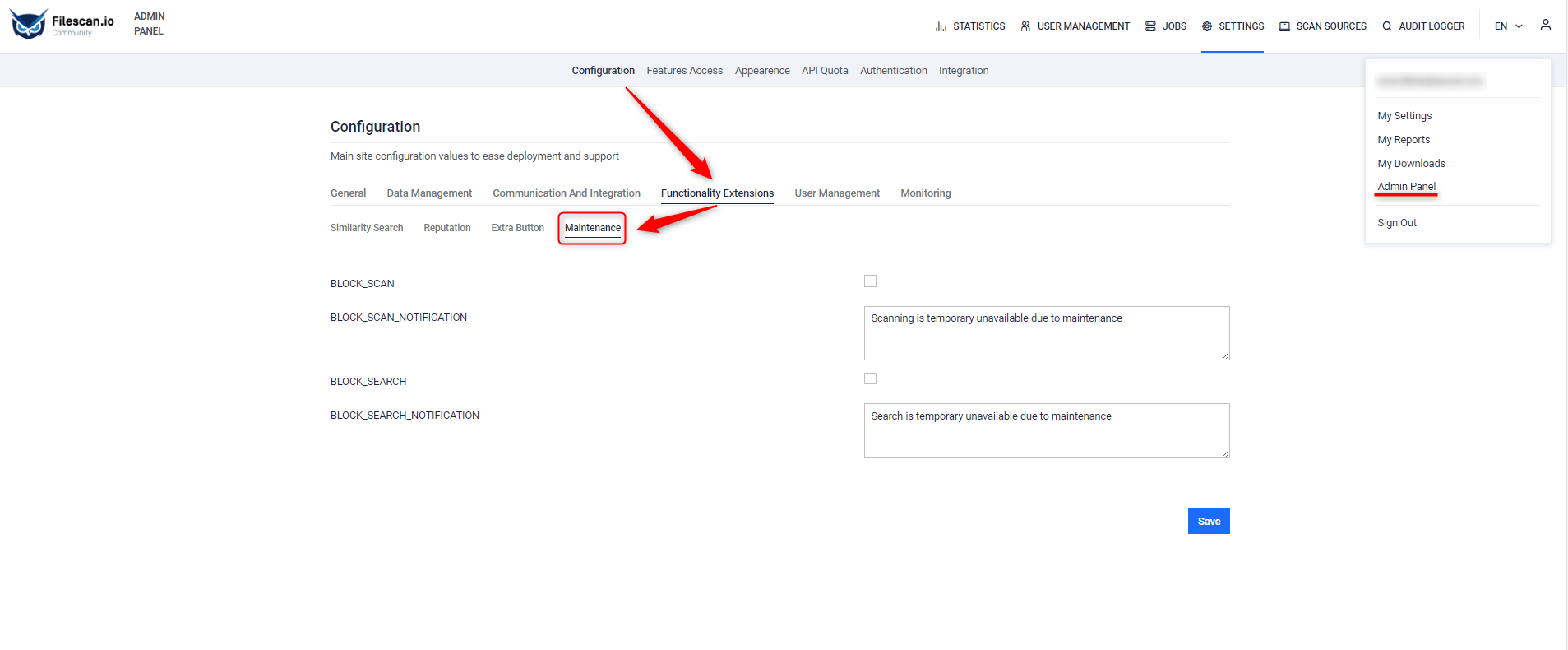
These configurations allow Admins to temporarily disable scanning and search functionalities within MetaDefender Sandbox, for maintenance tasks or updates, and provide users with informative notifications about the unavailability of these features during such periods.
Field | Description |
|---|---|
BLOCK_SCAN | This configuration enables or disables the scanning functionality. When the box is ticked, it indicates that scanning is blocked or disabled. |
BLOCK_SCAN_NOTIFICATION | Specifies the message or notification displayed to users when scanning functionality is blocked or disabled. In this case, the message is "Scanning is temporarily unavailable due to maintenance." |
BLOCK_SEARCH | This configuration enables or disables the search functionality. When the box is ticked, it indicates that searching is blocked or disabled. In this case, the message is |
BLOCK_SEARCH_NOTIFICATION | Specifies the message or notification displayed to users when search functionality is blocked or disabled. In this case, the message is "Search is temporarily unavailable due to maintenance." |