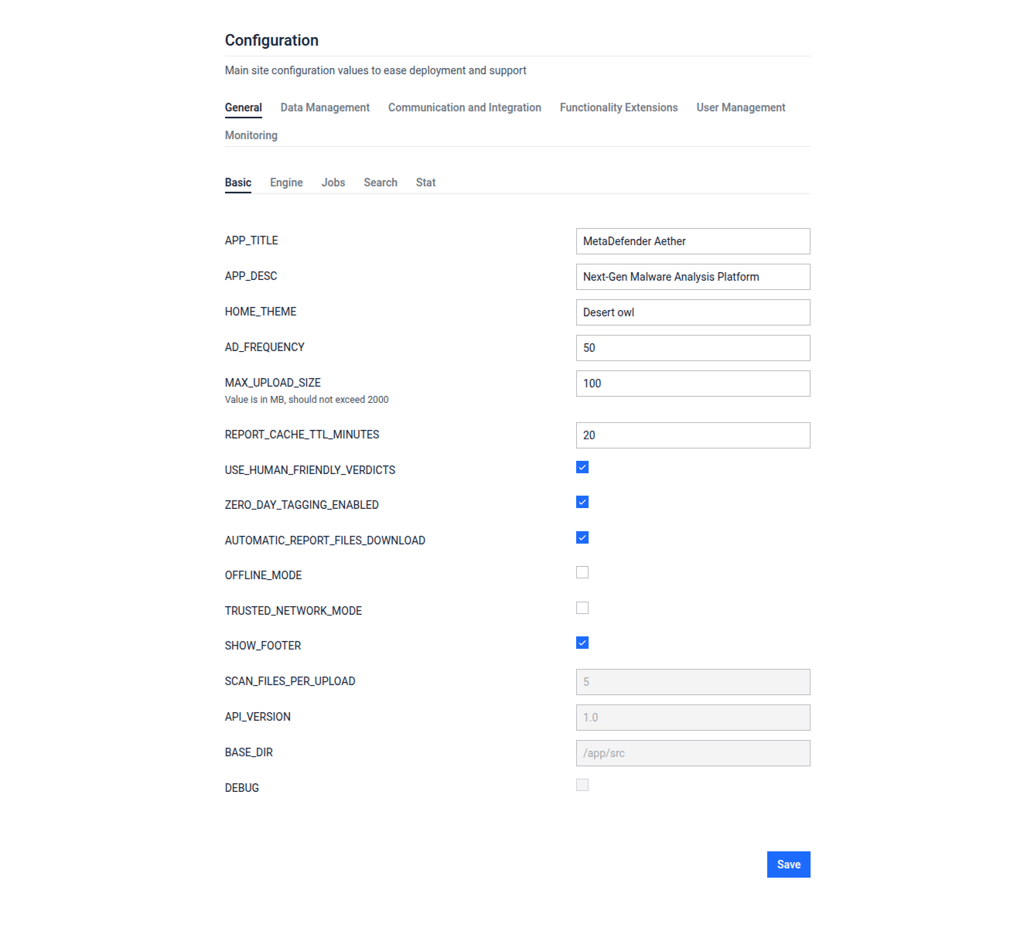
Here you will find the General configurations inside the Configurations part.
Admin Panel > Setting > Configurations > General
The following configurations are for controlling various aspects such as user interface elements, file upload limits, caching behaviour, and API version.
Field | Description |
|---|---|
APP_TITLE | This configuration specifies the title of the application, which is "Filescan.IO" in this case. However, it can be configured to the user specific organization or needs. |
APP_DESC | This can describe the application briefly or display a slogan. In this case, it states MetaDefender Sandbox slogan, which is a "Next-Gen Malware Analysis Platform". |
HOME_THEME | Home page theme can be selected. |
AD_FREQUENCY | In the given % of the reports there will be an advertisement presented for community users on the report page pointing towards commercial version's page. There are no advertisements in the standalone product. |
MAX_UPLOAD_SIZE | Sets the maximum allowed size for file uploads, given in megabytes (MB). It shouldn't exceed 2000 MB, or 2 gigabytes (GB). In this case, it's set to 100 MB. |
REPORT_CACHE_TTL_MINUTES | Specifies the time-to-live (TTL) for cached reports, in minutes. Reports will be cached for 20 minutes in this configuration. |
USE_HUMAN_FRIENDLY_VERDICTS | If enabled, human friendly verdicts will be used. If disabled, risk score based verdicts will be used. More info: Report Verdict |
AUTOMATIC_REPORT_FILES_DOWNLOAD | If enabled, the Webservice will download extracted and embedded files that are associated with the scan report. Note: The additional URL screenshot for brand detection (formerly phising) is only available if enabled. |
OFFLINE_MODE | Use this option if you are using your application in an air-gapped environment. |
TRUSTED_NETWORK_MODE | If enabled, only the following network communications are allowed:
|
SHOW_FOOTER | Likely a boolean flag indicating whether to display a footer on the application's interface. |
SCAN_FILES_PER_UPLOAD | Determines the number of files that can be scanned per upload. Set to 5 in this case. |
API_VERSION (read-only) | Specifies the version of the API being used, set to 1.0 here. |
BASE_DIR (read-only) | Specifies the base directory for the application's source files, set to "/app/src" |
DEBUG (read-only) | Likely a boolean flag indicating whether the application is in debug mode. |