Description:
Global Navigation & Context Header
What changed
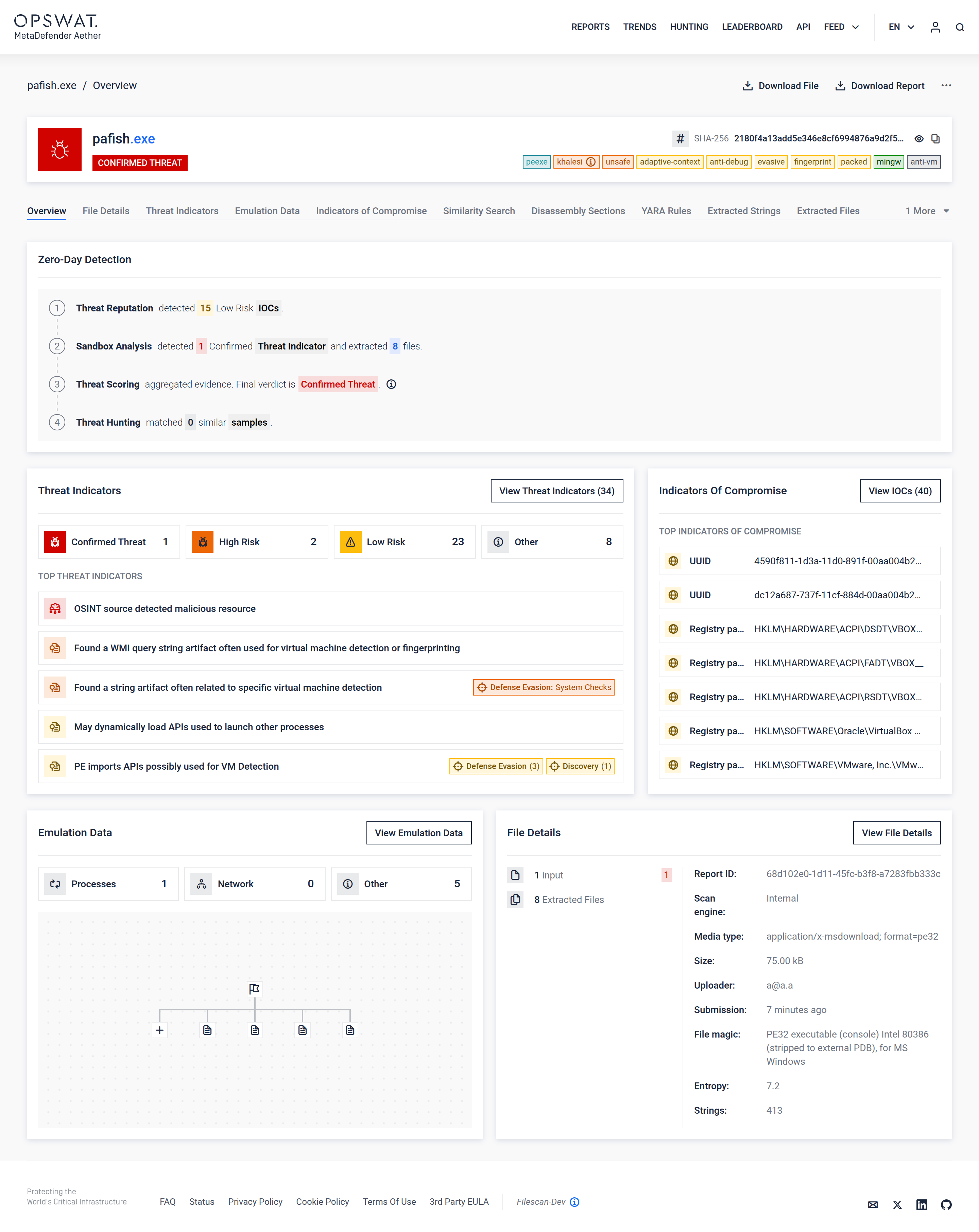
The UI is now framed as MetaDefender Aether, not MetaDefender Sandbox
Global navigation exposes Reports, Trends, Hunting, Leaderboard, API, and Feed directly.
Why this matters
Analysts immediately understand they are in a zero-day detection solution, not a single detonation view.
Navigation reflects the full lifecycle: analyze → correlate → hunt → operationalize.
This eliminates the mental gap between “sandbox results” and “threat intelligence workflows.”
Sample Overview Header (File Identity & Verdict)
What changed
The file name, hash, and final verdict (Confirmed Threat) are clearly prioritized.
Contextual tags (packer, evasion, anti-debug, fingerprinting, etc.) surface immediately.
Why this matters
Analysts no longer need to scroll or pivot to understand what kind of threat this is.
Tags provide instant behavioral context without reading long reports.
The verdict is unambiguous and authoritative, reinforcing the “single trusted verdict” model.
Zero-Day Detection Pipeline Summary (Layered View)
What changed
A dedicated Zero-Day Detection section explicitly shows:
Threat Reputation
Sandbox Analysis
Threat Scoring
Threat Hunting
Why this matters
This visualizes the four-layer detection pipeline, not just execution results.
Analysts see how verdicts are formed, increasing trust and explainability.
It directly maps to how SOCs think about detection confidence.
Threat Indicators Panel (Evidence at a Glance)
What changed
Indicators are grouped by Confirmed, High Risk, Low Risk, and Other.
“Top Threat Indicators” highlights the most meaningful behaviors first.
Why this matters
Analysts are no longer overwhelmed by raw signal noise.
Risk is contextualized, not just listed.
This directly reduces alert fatigue and triage time.
Indicators of Compromise (IOC) Section
What changed
IOCs are surfaced alongside analysis, not buried in exports.
Registry keys, UUIDs, and system artifacts are immediately visible.
Why this matters
Analysts can act immediately: block, hunt, enrich SIEM/SOAR.
Reinforces Aether’s role as an IOC generation engine, not just a detector.
Emulation Data Visualization
What changed
Execution is shown as a clean, simplified process tree.
Counts for processes, network activity, and other behaviors are summarized.
Why this matters
Emulation results are understandable at a glance.
Analysts can quickly confirm whether behavior executed, staged, or stalled.
The visualization reflects emulation success, not VM noise.
File Details Panel
What changed
File metadata (entropy, size, magic, strings, extracted files) is consolidated.
Extraction counts are clearly shown.
Why this matters
Analysts can assess obfuscation, packing, and complexity instantly.
Supports fast decisions without opening secondary views.
Tabbed Deep-Dive Architecture
Tabs include:
Threat Indicators
Emulation Data
Indicators of Compromise
Similarity Search
Disassembly Sections
YARA Rules
Extracted Strings / Files
Why this matters
The UI supports progressive disclosure:
SOC analysts stop early.
Malware researchers go deep.
Similarity Search being a first-class tab reinforces campaign-level thinking.
Threat Pattern Correlator as a Core Concept
What changed
Threat Pattern Correlator is embedded, not an external workflow.
Why this matters
Zero-day detection does not stop at one file.
Analysts can immediately see whether this threat connects to known families or campaigns.
This elevates the UI from analysis to threat hunting.
Bottom Line
The new MetaDefender Aether UI is not just a visual refresh. It is a workflow redesign that:
Reinforces the four-layer zero-day detection pipeline
Reduces analyst cognitive load
Accelerates triage and response
Bridges sandboxing, threat intelligence, and hunting
Aligns UX with how modern SOCs actually operate