
You will find the Similarity Search Settings in the Additional Scan Steps tab among Configurations Admin Panel > Settings > Configuration > Additional Scan Steps tab
Customers are not recommended to interact the following fields as these are mainly for the Admin
The Similarity Search is disabled by default.
If it is enabled, you may find the same values set by default for each field.
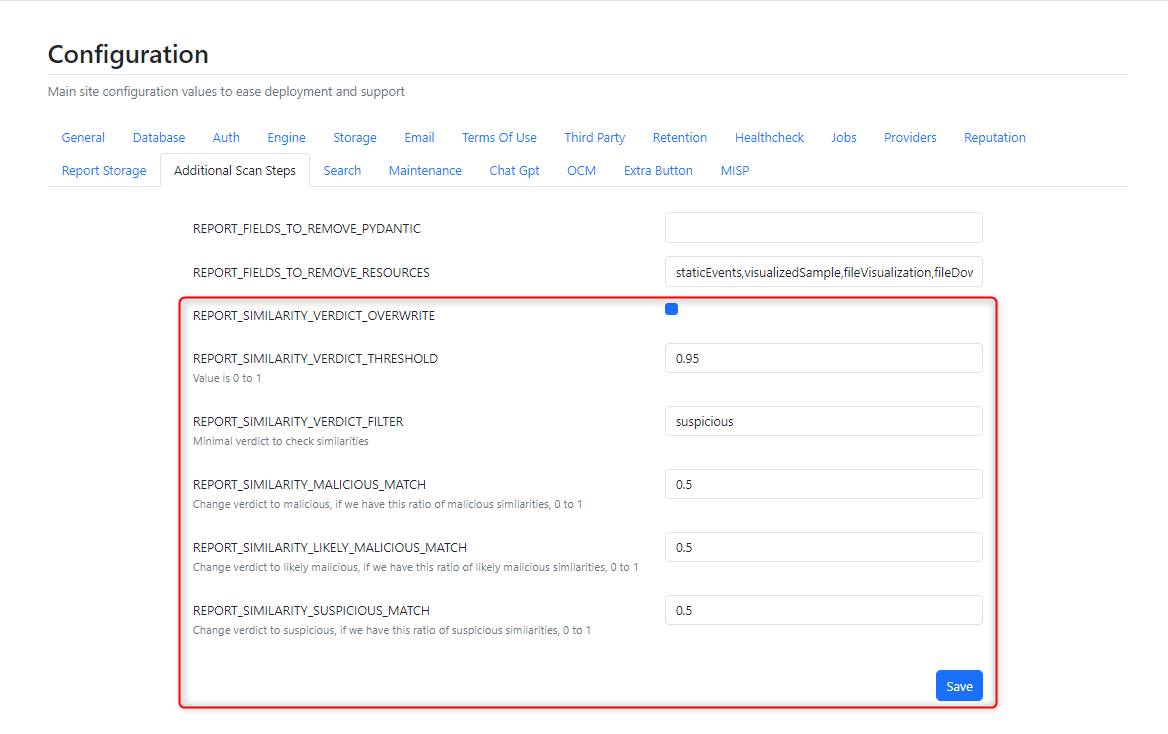
Field | Description | Values |
|---|---|---|
REPORT_SIMILARITY_VERDICT_OVERWRITE | After the report is completed, it tries to search for similar reports that has been already processed. It will look at the verdict and can modify it. (e.g. If previous similar reports show | ON/OFF |
REPORT_SIMILARITY_VERDICT_THRESHOLD | Specifies a threshold value (ranging from 0 to 1) for similarity checks. If the similarity ratio exceeds this threshold, it triggers a specific action or verdict overwrite | Percentage converted to decimal |
REPORT_SIMILARITY_VERDICT_FILTER | Determines the minimal level of similarity verdict that needs to be checked against other samples (e.g., only consider similarities categorized as suspicious or higher) |
|
REPORT_SIMILARITY_MALICIOUS_MATCH | If the ratio of identified malicious similarities exceeds this threshold (0 to 1), the overall verdict for the analyzed sample is changed to "malicious." | Percentage converted to decimal |
REPORT_SIMILARITY_LIKELY_MALICIOUS_MATCH | Similarly, if the ratio of likely malicious similarities surpasses this threshold (0 to 1), the verdict is adjusted to "likely malicious." | Percentage converted to decimal |
REPORT_SIMILARITY_SUSPICIOUS_MATCH | If the ratio of suspicious similarities meets or exceeds this threshold (0 to 1), the verdict is altered to "suspicious." | Percentage converted to decimal |