Overview MetaDefender Sandbox API Reference Release Notes
Getting Started
Deployment & Usage
Support
FAQ
2.1.0
Search this version
FAQ
FAQ
General
Title
Message
Create new category
What is the title of your new category?
Edit page index title
What is the title of the page index?
Edit category
What is the new title of your category?
Edit link
What is the new title and URL of your link?
How do I set my time zone and locale?
Copy Markdown
Open in ChatGPT
Open in Claude
MetaDefender Sandbox now allows users to set their preferred timezone and locale.
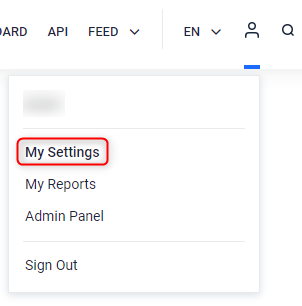
Users can navigate to My Settings > Preferences
Step 1
Go to the Admin Panel icon and choose the My settings menu option.
Step 2
Select the Preferences tab to set the preferred Timezone as well as Locale (date format).
Note that the default settings match your browser/system configuration.
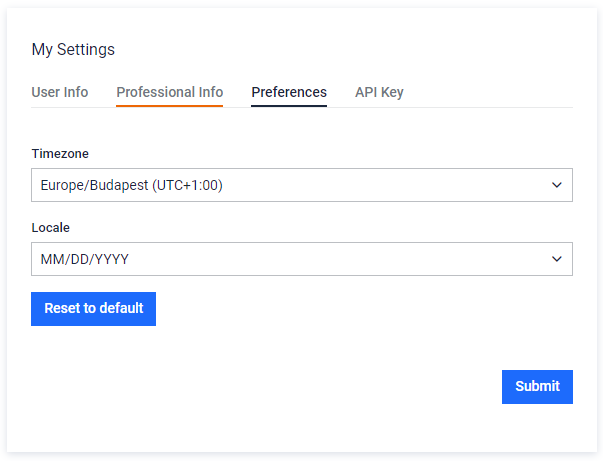
All timestamps on the Sandbox UI should be displayed following the timezone/locale configuration. For example:

Type to search, ESC to discard
Last updated on
Was this page helpful?
Next to read:
How do I get my API key?See the "Technical Datasheet" for a complete list of features: https://docs.opswat.com/filescan/datasheet/technical-datasheet
Discard Changes
Do you want to discard your current changes and overwrite with the template?
Archive Synced Block
Message
Create new Template
What is this template's title?
Delete Template
Message
